
Getting ping time between hosts
As a way to obtain interhost latency (ping time or lag) from ProudNet, the ping time obtained is the roundtrip latency, which is the time taken to send a message from one host to the other and then respond immediately to it from the other host.
- Function to obtain latency of one client from the server
| C++ function | C# function | Description |
|---|---|---|
Proud.CNetServer.GetLastPingSec | Nettention.Proud.NetServer.GetLastReliablePingSec | Get the last wait time in seconds for that client. |
Proud.CNetServer.GetLastUnreliablePingMs | Nettention.Proud.NetServer.GetLastUnreliablePingMs | Get the last latency for that client in Ms. |
Proud.CNetServer.GetRecentPingSec | Nettention.Proud.NetServer.GetRecentReliablePingSec | Get the last wait time in seconds for that client. |
Proud.CNetServer.GetRecentUnreliablePingMs | Nettention.Proud.NetServer.GetRecentUnreliablePingMs | Get the last latency for that client in Ms. |
- Functions to get the latency of the server or other P2P connected clients from the client
| C++ function | C# function |
|---|---|
Proud.CNetClient.GetLastUnreliablePingSec | Nettention.Proud.NetClient.GetLastUnreliablePingSec |
Proud.CNetClient.GetLastUnreliablePingMs | Nettention.Proud.NetClient.GetLastUnreliablePingMs |
Proud.CNetClient.GetLastReliablePingSec | Nettention.Proud.NetClient.GetLastReliablePingSec |
Proud.CNetClient.GetLastReliablePingMs | Nettention.Proud.NetClient.GetLastReliablePinMs |
Proud.CNetClient.GetRecentUnreliablePingSec | - |
Proud.CNetClient.GetRecentUnreliablePingMs | Nettention.Proud.NetClient.GetRecentUnreliablePingMs |
Proud.CNetClient.GetRecentReliablePingSec | Nettention.Proud.NetClient.GetRecentReliablePingSec |
Proud.CNetClient.GetRecentReliablePingMs | Nettention.Proud.NetClient.GetRecentReliablePingMs |
Starting with version 1.7.40679-master, we added a new function to get the latency from the client to the server. Previous functions like GetLast~ or GetRecent~ had a problem with ping pong being delayed when the network condition was not smooth.
If you have access to 1.7.40679 or later, we recommend using the function to get the latency with the newly added server.
Reliable message delivery is a two-way communication method, which means that sending and receiving times are slower than Unreliable, but the order of sending and receiving and the certainty of arrival are guaranteed.
Unreliable message delivery is a one-way communication method that has a faster send and receive time than Reliable, but the order in which messages are sent and received can be out of order and arrival is not guaranteed.
Communicating between programs in different languages
Sometimes you want two programs to communicate with ProudNet, but in different programming languages. In these cases, the PIDL compiler will generate proxies and stubs in two or more languages, and each program can then grab and write what it needs.
Basic types like int, double, and string are already provided by ProudNet's wrapping modules for languages other than C++. However, in different languages, these primitive types are named differently by default. For example, in C#, the string class is System.String, whereas in C++ it is std::string, std::wstring, ATL::CString, Proud::String.
To address this, the PIDL compiler provides the ability to change the type of variables in the generated proxy and stub to be language specific if desired.
Below is an example of usage.
// Rename TypeA to TypeB when creating proxy,stub in C# language.
rename cs(TypeA, TypeB);
// Rename TypeC to TypeD when creating proxy,stub in C++ language.
rename cpp(TypeC, TypeD);

global XXX 2000
{
    Foo([in]TypeA a);  // When creating a proxy,stub in C# language, it will be Foo(TypeB a),
    Goo([in]TypeC c);  // When creating a proxy,stub in C++ language, it will be Goo(TypeD c).
}
User-defined data for each host (Host Tag)
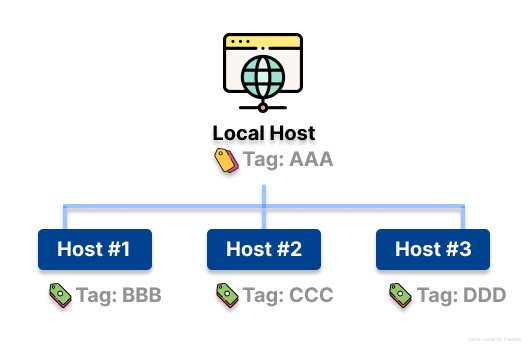
The Proud.HostID is included for identification when receiving RMI or event callbacks. When developing a game server, if you get a Proud.HostID, you can retrieve an object for that Host based on that value and then work with it, which is how the ProudNet sample program is built.
A Host Tag is identifying data, other than the Host ID, that you can define for the local host and other hosts.
You can use them to make your program perform better.
OnClientJoin(CNetClientInfo* clientInfo)
{
    // If the host leaves during the execution of the OnClientJoin function, SetHostTag may fail
    // so it is recommended to check the following.
    CNetClientInfo outInfo;
    if(m_client->GetClientInfo(clientInfo->m_HostID,outInfo))
    {
        Host* r = new Host;
        SetHostClientTag(clientInfo->m_HostID, r);
    }
}

DEFRMI_XXX_YYY(MYCLASS)
{
    void* tag = RmiContext.m_hostTag;
    // If SetHostTag failed, RmiContext.m_hostTag may be NULL and needs to be checked.
    if(tag != NULL)
    {
        Host* obj = (Host*)tag;     // No cost to find
        obj->Something();
    }
}
Example when Host Tag is not used
DEFRMI_XXX_YYY(MYCLASS)
{
    Host* obj = Lookup(HostID);  // Incurring the cost of finding
    if(obj != NULL)
        obj->Something();
}
The Host Tag is specified by the following methods.
| C++ function | C# function |
|---|---|
Proud.CLanClient.SetHostTag | - |
Proud.CLanServer.SetHostTag | - |
Proud.CNetClient.SetHostTag | Nettention.Proud.NetClient.SetHostTag |
Proud.CNetServer.SetHostTag | Nettention.Proud.NetServer.SetHostTag |
CLanClient and CLanServer are not supported starting in version 1.7.
NetClient and NetServer take over the roles of CLanClient and CLanServer.
The Host Tag is received via Proud.RmiContext.m_hostTag and Proud.CNetPeerInfo.m_hostTag and is not synchronized over the network, so it is not propagated to the other party.
Setting up a Thread Pool
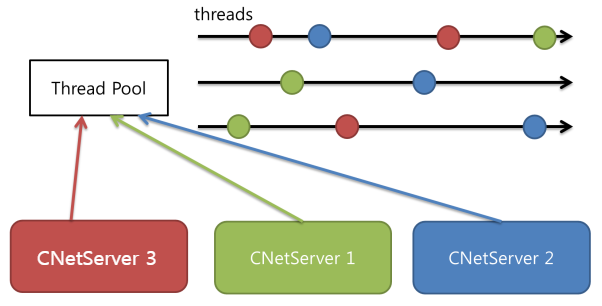
The network client module CNetClient and the server module CNetServer in ProudNet use two types of Thread Pool.
Networker thread pool: Used exclusively for internal processing of the ProudNet, handling socket I/O, etc.
User worker thread pool: For running user-defined routines. Handle RMI or callback events, etc.
For best performance, create thread pools explicitly and set them up in the Network module if you want certain thread pools to be shared instead of each module owning them.
Currently, you need to include ProudNetServer.h to use this feature on the client end, but starting with 1.7.36365, you do not need to include ProudNetServer.h to use it.
A user-created thread pool object will throw an exception if it is destroyed before all network modules are destroyed.
Below is the pseudo code involved in the overall flow.
C++
// The object responsible for callbacks for threadpool startup/shutdown.
Proud::CThreadPoolEventFunctional e;

// In other words, put in a routine for starting/shutting down the threadpool. (Optional)
e.OnThreadBeginFunction = [](){...};
e.OnThreadEndFunction = [](){...};

// Creates a thread pool object with as many threads as the number of CPUs.
Proud::CThreadPool* p = Proud::CThreadPool::Create(&e, GetNoofProcessors());
// If you want to have two threads
Proud::CThreadPool* p = Proud::CThreadPool::Create(&e, 2);

// ----------Forward the object to which this thread pool is registered as a parameter.----------
// For the server end
Proud::CStartServerParameter param;
param.m_externalUserWorkerThreadPool = p;

// For the client end
Proud::CNetConnectionParam param;
// Types of Thread Models in a ProudNet See also Open the link in a new window
param.m_userWorkerThreadModel = Proud::ThreadModel::ThreadModel_UseExternalThreadPool;
param.m_externalUserWorkerThreadPool = p;
C#
// If you want to have two threads
Nettention.Proud.ThreadPool p = new Nettention.Proud.ThreadPool(2);

// ----------Forward the object to which this thread pool is registered as a parameter.----------
// For the server end
Nettention.Proud.StartServerParameter param = new Nettention.Proud.StartServerParameter();
param.SetExternalUserWorkerThreadPool(p);

// For the client end
Nettention.Proud.NetConnectionParam param = new Nettention.Proud.NetConnectionParam();
// Types of Thread Models in a ProudNet See also Open the link in a new window
param.userWorkerThreadModel = Nettention.Proud.ThreadModel.ThreadModel_UseExternalThreadPool;
param.SetExternalUserWorkerThreadPool(p);
Setting up a thread pool is basically the same as above, with different values depending on your case. You can set up several thread models not only on servers but also on clients.
- Multiple Network Modules Share the Same Thread Pool
C++
Proud::CStartServerParameter param1;
Proud::CStartServerParameter param2;
Proud::CStartServerParameter param3;

//Explicitly create a thread pool object with Proud::CThreadPool::Create()
Proud::CThreadPool* p = Proud::CThreadPool::Create(...);

//Share the user worker thread pool
//The Networker thread pool is not shared, leaving the default settings in place.
param1.m_externalUserWorkerThreadPool = p;
param2.m_externalUserWorkerThreadPool = p;
param3.m_externalUserWorkerThreadPool = p;
C#
Nettention.Proud.StartServerParameter param1 = new Nettention.Proud.StartServerParameter();
Nettention.Proud.StartServerParameter param2 = new Nettention.Proud.StartServerParameter();
Nettention.Proud.StartServerParameter param3 = new Nettention.Proud.StartServerParameter();

Nettention.Proud.ThreadPool p = new Nettention.Proud.ThreadPool(2);

//Share the user worker thread pool
//The Networker thread pool is not shared, leaving the default settings in place.
param1.SetExternalUserWorkerThreadPool(p);
param2.SetExternalUserWorkerThreadPool(p);
param3.SetExternalUserWorkerThreadPool(p);
- Use different numbers of Networker and User worker thread pools
C++
Proud::CStartServerParameter param;

Proud::CThreadPool* p1 = Proud::CThreadPool::Create(..., 1);
Proud::CThreadPool* p2 = Proud::CThreadPool::Create(..., 4);

param.m_externalNetWorkerThreadPool = p1;
param.m_externalUserWorkerThreadPool = p2;
C#
Nettention.Proud.StartServerParameter param = new Nettention.Proud.StartServerParameter();

Nettention.Proud.ThreadPool p1 = new Nettention.Proud.ThreadPool(1);
Nettention.Proud.ThreadPool p2 = new Nettention.Proud.ThreadPool(4);

param.SetExternalNetWorkerThreadPool(p1);
param.SetExternalUserWorkerThreadPool(p2);
- Consolidate thread pool for Networker and User worker
C++
Proud::CStartServerParameter param;
Proud::CThreadPool* p = Proud::CThreadPool::Create(..., 8);
param.m_externalNetWorkerThreadPool = p;
param.m_externalUserWorkerThreadPool = p;
C#
Nettention.Proud.StartServerParameter param = new Nettention.Proud.StartServerParameter();
Nettention.Proud.ThreadPool p = new Nettention.Proud.ThreadPool(8);
param.SetExternalNetWorkerThreadPool(p);
param.SetExternalUserWorkerThreadPool(p);
- Pure single-threaded model
As a way to run a pure single-threaded server as many as the number of CPUs, you must create a thread pool object with no threads at all and manually continuously call a function that makes the thread pool breathe.
When specifying a Networker thread pool, do not call things like Process or FrameMove too slowly. The methods that are called should complete the necessary processing as quickly as possible.
Otherwise, you might get weird ping measurements internally, disconnections between server and client, etc.
C++
Proud::CStartServerParameter param;
Proud::CThreadPool* p = Proud::CThreadPool::Create(..., 0);

param.m_externalNetWorkerThreadPool = p;
param.m_externalUserWorkerThreadPool = p;
....

void main()
{
    while(true)
    {
        // Wait up to 10 milliseconds to process events that have accumulated in the thread pool.
        p->Process(10);
    }
}
C#
Nettention.Proud.StartServerParameter param = new Nettention.Proud.StartServerParameter();
Nettention.Proud.ThreadPool p = new Nettention.Proud.ThreadPool(0);

param.SetExternalNetWorkerThreadPool(p);
param.SetExternalUserWorkerThreadPool(p);
....

static void Main(string[] args)
{
    while (true)
    {
        // Wait up to 10 milliseconds to process events that have accumulated in the thread pool.
        p.Process(10);
    }
}
Setting up the Thread Model - Client
Above, we separated the user worker and networker to prevent mistakes from happening, but we still need to explicitly call FrameMove. This gives you the advantage of being able to run stacked RMI at any point in time.
Setting up a Thread Model is a way to ensure that you do not have to worry about complicated code on the client side, such as calling Process or FrameMove, causing logic to break or accidentally missing code. ProudNet provides a lot of manipulation over networking, but you can also set it up so that you do not care about it.
- ProudNet Thread Model Types
ThreadModel_SingleThreaded: RMI and message callbacks complete when the user invokes FrameMove. (Default value)
ThreadModel_MultiThreaded: The callback completes immediately, even if the user does not invoke FrameMove.
ThreadModel_UseExternalThreadPool: When specifying a thread pool, you must set it to this.
You can set the above values in the m_netWorkerThreadModel and m_userWorkerThreadModel of the CNetConnectionParam. The default value is ThreadModel_SingleThreaded.
C++
Proud::CNetConnectionParam param;

//If you want to use custom thread pools for both user worker and network
param.m_userWorkerThreadModel = Proud::ThreadModel::ThreadModel_UseExternalThreadPool;
param.m_netWorkerThreadModel = Proud::ThreadModel::ThreadModel_UseExternalThreadPool;

//If you do not want to simply call FrameMove
param.m_userWorkerThreadModel = Proud::ThreadModel::ThreadModel_MultiThreaded;
C#
Nettention.Proud.NetConnectionParam param = new Nettention.Proud.NetConnectionParam();

//If you want to use custom thread pools for both user worker and network
param.userWorkerThreadModel = Nettention.Proud.ThreadModel.ThreadModel_UseExternalThreadPool;
param.netWorkerThreadModel = Nettention.Proud.ThreadModel.ThreadModel_UseExternalThreadPool;

//If you do not want to simply call FrameMove
param.userWorkerThreadModel = Nettention.Proud.ThreadModel.ThreadModel_MultiThreaded;
Running user routines asynchronously
You can run your function or Lambda expression A asynchronously with Proud.IRmiHost.RunAsync(). Proud.IRmiHost.RunAsync() returns immediately, and A runs on one of the threads in the thread pool.
If you want A to run for host H with a given HostID, you guarantee that H's callback function and A will not run at the same time.
C++
Proud::CNetServer* s = ...;
Proud::HostID r1 = ...;
string a = ...;

s->RunAsync(r1, [a] { WriteSomething(a); });
Warnings for excessive sending volume
ProudNet's servers and network have the ability to detect and warn when the amount of sending is too much for the line speed. Proud.INetCoreEvent.OnWarning with ErrorType_SendQueueIsHeavy is called.
If you are sending too much, we recommend refining unnecessary messaging or Throttling.