# C\#

通過以下鏈接下載 ProudChat C# SDK 。

## :open\_file\_folder: [C# ProudChat SDK](https://github.com/Nettention/ProudChatSDK/tree/main/ChatClientSDK/DotNet/ProudChat)

## 項目設置

通過 git 下載的 SDK 文件夾中的 DotNetProudChat 項目文件被添加到您使用的解決方案中 。
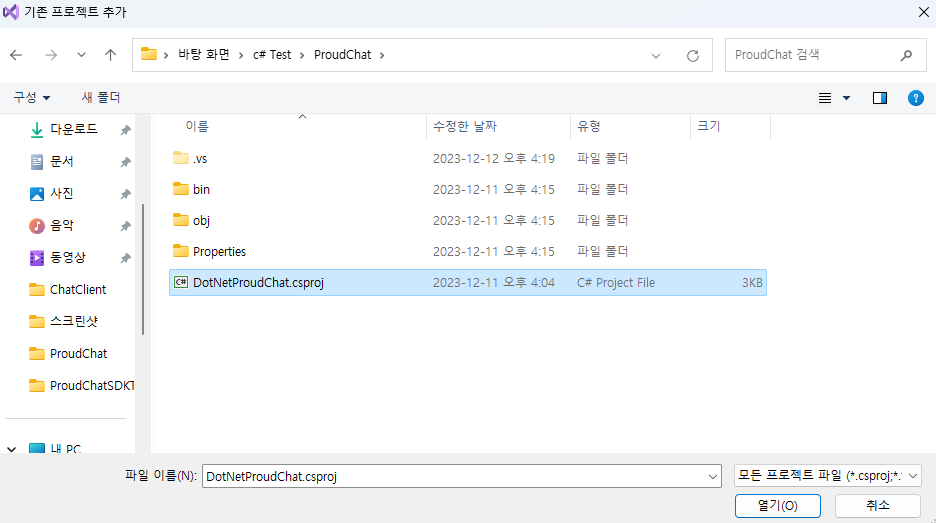
<figure><img src="/files/3uHD1fEojzi5ExBVTYDu" alt=""><figcaption></figcaption></figure>

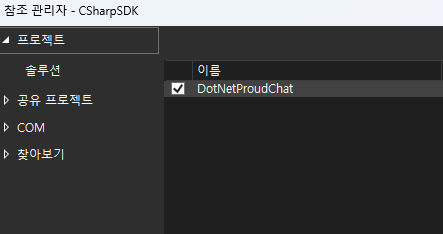
在根項目中， 通過添加項目參考來引用 DotNetProudChat 。

<figure><img src="/files/yFrMYTdt7IbQKFvsN6tT" alt=""><figcaption></figcaption></figure>

## ChatClient 對象

### - 創建

```csharp
Proud.ChatClient chatClient = new Proud.ChatClient();
```

### - ChatClient.Init

進行ChatClient Initialize的部分。 用戶在使用前必須調用Init函數與服務器連接。

<table data-full-width="true"><thead><tr><th width="137">函數名</th><th>參數</th><th>註釋</th></tr></thead><tbody><tr><td>Init</td><td><a href="https://console.nettention.com"><strong>Proud Console</strong></a>提供的<mark style="color:orange;">用戶的UUID</mark>、<mark style="color:orange;">用戶生成的項目的UUID</mark>、<mark style="color:orange;">用戶固有的UniqueID,</mark> <br><mark style="color:orange;">Server Connection</mark>成功時調用的事件，<mark style="color:orange;">Server Login</mark>失敗時調用的事件</td><td>用戶將 ChatClient 作爲與服務器連接的函數來編寫此部分 。<br>參數包括項目初始化所需的字符串(<mark style="color:orange;">authUUID</mark>,  <mark style="color:orange;">projectUUID</mark>, <mark style="color:orange;">uniqueID</mark>)和確認登錄成功、失敗與否的活動2個。</td></tr></tbody></table>

### - 函數

<table data-full-width="true"><thead><tr><th width="231">函數名</th><th width="276">參數</th><th>註釋</th></tr></thead><tbody><tr><td>Add_Channel</td><td>您想要訪問的頻道的固有Key</td><td>用於連接特定頻道時 。</td></tr><tr><td>Leave_Channel</td><td>想播出的頻道的固有Key</td><td>想退出連接的頻道時使用。</td></tr><tr><td>Send_Msg</td><td>特定對方固有的識別值， 要發送給特定對象的信息</td><td>用於向特定對象發送消息。</td></tr><tr><td>Send_ChannelMsg</td><td>特定渠道的獨特識別值， 要發送給特定頻道的消息</td><td>用於向特定頻道發送消息。</td></tr></tbody></table>

### - 事件變數

<table data-full-width="true"><thead><tr><th width="298">事件變數</th><th>註釋</th></tr></thead><tbody><tr><td>chatClientJoinCompleteDelegate</td><td>ChatClient 完成 <mark style="color:orange;">Init</mark> 後發生的事件<br>用戶可以註冊Event使用。</td></tr><tr><td>chatClientJoinFailedDelegate</td><td>當 ChatClient <mark style="color:orange;">Init Failed</mark> 時發生的事件<br>用戶可以註冊Event使用。<br><mark style="color:orange;">回傳</mark>作為參數接收的<mark style="color:orange;">錯誤訊息</mark>。</td></tr><tr><td>channelMsg_ResponseDelegate</td><td>Channel Message 到達時發生的事件 <br>用戶可以註冊Event使用。<br>作爲參數接收<mark style="color:orange;">來自消息的頻道的Unique ID</mark>、<mark style="color:orange;">產生消息的對象的Unique ID</mark>以及<mark style="color:orange;">對方發送的消息</mark>。</td></tr><tr><td>sendMsg_ResponseDelegate</td><td>Send Message到達時進行Event處理。<br>用戶可以註冊Event使用。<br>獲取作爲參數<mark style="color:orange;">生成消息的對象的Unique ID</mark>和<mark style="color:orange;">對方的Unique ID</mark>。</td></tr><tr><td>notice_ResponseDelegate</td><td>Notice到達時進行Event處理。<br>用戶可以註冊Event使用。<br><mark style="color:orange;">傳回</mark>作為參數接收的<mark style="color:orange;">通知的內容</mark>。</td></tr></tbody></table>

### - 事件函數

<table data-full-width="true"><thead><tr><th width="289">函數名</th><th>註釋</th></tr></thead><tbody><tr><td>ChannelMsg_Stub</td><td>處理 ChannelMsg 到達時發生的事件 。<br>接收<mark style="color:orange;">來自消息通道的 Unique ID</mark> 和<mark style="color:orange;">創建消息的 Unique ID</mark> 以及<mark style="color:orange;">對方發送的消息</mark>作爲參數。</td></tr><tr><td>SendMsg_Stub</td><td>處理用戶間Send_Msg到達時發生的事件。<br>接收<mark style="color:orange;">創建消息的 Unique ID</mark> 和<mark style="color:orange;">對方發送的消息</mark>作爲參數。</td></tr><tr><td>Event_Notice</td><td>Notice到達時處理事件。<br>Proud Console發送公告時Delegate的函數</td></tr></tbody></table>


---

# Agent Instructions: Querying This Documentation

If you need additional information that is not directly available in this page, you can query the documentation dynamically by asking a question.

Perform an HTTP GET request on the current page URL with the `ask` query parameter:

```
GET https://docs.proudnet.com/proudnet.cn/proudchat/download/c.md?ask=<question>
```

The question should be specific, self-contained, and written in natural language.
The response will contain a direct answer to the question and relevant excerpts and sources from the documentation.

Use this mechanism when the answer is not explicitly present in the current page, you need clarification or additional context, or you want to retrieve related documentation sections.