# \[1.6 版本] 服務器間 LAN 通訊器

{% hint style="danger" %}
LanServer, LanClient從1.7版本開始退役。\
Lan Server， LanClient 的角色由 <mark style="color:orange;">NetServer</mark>, <mark style="color:orange;">NetClient</mark> 代替 。<br>

**參考**\
[**從ProudNet 1.6 Lan Module 遷移到 1.7 Net Module**](#proudnet-1.6-lan-module-1.7-net-module)
{% endhint %}

## LAN通訊器的特點

ProudNet服務器與網絡和服務器之間的LAN通信器的區別如下。

<table data-full-width="true"><thead><tr><th width="316">劃分</th><th width="385">ProudNet 服務器與網絡</th><th>服務器間LAN通信器</th></tr></thead><tbody><tr><td>主要用途</td><td>普通用戶應用程序和服務器的通信</td><td>分散式伺服器結構中各伺服器之間的通信</td></tr><tr><td>NAT 裝置滲透性</td><td>YES</td><td>NO</td></tr><tr><td>P2P relay(relay)</td><td>YES</td><td>NO</td></tr><tr><td>客戶端與服務器通信協議</td><td>TCP and UDP</td><td>TCP</td></tr><tr><td>P2P 通信協議</td><td>(Reliable) UDP</td><td>TCP</td></tr><tr><td>客戶回撥方式</td><td>Poll (來自<mark style="color:orange;">Proud.CNetClient.FrameMove</mark>的回調)</td><td>從線程池回調</td></tr></tbody></table>

<mark style="color:orange;">lan\_main</mark>提供以下主機間高速通信。

> * 由於它僅使用 TCP，因此它使用伺服器硬體的通訊加速（TCP Offload Engine）。
> * 與<mark style="color:orange;">Client</mark>不同，事件和接收消息會在線程池中進行回撥。\
>   當然，服務器方也會在thread pool中發生回電。

## LAN 通訊器的使用方法

ProudNet服務器和網絡以及LAN通信器的用法幾乎相同。

以下是API的差異。

<table><thead><tr><th width="221">劃分</th><th width="261">ProudNet 服務器與網絡</th><th>服務器間LAN通信器</th></tr></thead><tbody><tr><td>Server</td><td>Proud.CNetServer</td><td>Proud.CLanServer</td></tr><tr><td>Client</td><td>Proud.CNetClient</td><td>Proud.CLanClient</td></tr><tr><td>Server event handler</td><td>Proud.INetServerEvent</td><td>Proud.ILanServerEvent</td></tr><tr><td>Client event handler</td><td>Proud.INetClientEvent</td><td>Proud.ILanClientEvent</td></tr><tr><td>Message pool method</td><td>Proud.CNetClient.FrameMove</td><td>None (callback in thread pool)</td></tr></tbody></table>

## LAN 通信器的 P2P 通信

<mark style="color:orange;">Proud.CLanClient</mark>主機之間的P2P通信使用TCP協議。

在<mark style="color:orange;">Proud.CLanServer.CreateP2PGroup</mark>等實現主機間P2P通信的瞬間啓動P2P消息時,在Pier間TCP連接完成之前,想要發送的信息將保存在各主機的本地queue中。 保存的信息在TCP連接成功後立即開始傳送。

一旦 TCP 連線建立，<mark style="color:orange;">Proud.ILanClientEvent.OnP2PConnectionEstablished</mark>, <mark style="color:orange;">Proud.ILanServerEvent.OnP2PConnectionEstablished</mark> 就會被回調。

反之，當TCP連線中斷時，會回呼<mark style="color:orange;">Proud.ILanClientEvent.OnP2PDisconnected</mark>, <mark style="color:orange;">Proud.ILanServerEvent.OnP2PDisconnected</mark>。

當為 P2P 群組中的所有成員建立 TCP 連線時，<mark style="color:orange;">Proud.ILanClientEvent.OnGroupP2PConnectionComplete</mark>, <mark style="color:orange;">Proud.ILanServerEvent.OnGroupP2PConnectionComplete</mark> 會被回呼。

## LAN 通信設備上的 thread pool

<mark style="color:orange;">Proud.CLanClient</mark>是事件回撥和RMI回撥發生在線程池的線程中。 而且這個線程池是由 <mark style="color:orange;">Proud.CLanClient</mark> 準備的， 因此沒有對應於 <mark style="color:orange;">Proud.CNetClient.FrameMove</mark> 的函數 。

<mark style="color:orange;">Proud.CLanConnectionParam.m\_netWorkerThreadCount</mark> 可以指定客戶機上所有線程池的線程數 。

<br>

## LAN 用戶端的斷線處理

LAN 用戶端在連線程序（<mark style="color:orange;">CLanClient.Connect</mark>）期間建立<mark style="color:orange;">user worker thread pool</mark>，並在中斷連線程序（<mark style="color:orange;">CLanClient.Disconnect</mark>）期間刪除該池，因此LAN 用戶端無法在<mark style="color:orange;">user worker thread</mark>上執行中斷或連線命令。

如果實現，將會發生<mark style="color:orange;">Proud.Exception</mark>。

<br>

## LAN 通信器的 RMI

與[**RMI**](https://docs.proudnet.com/proudnet.cn/proudnet/using_pn/rmi)使用方法相同。

## 在服務器間通信中同步時間

與[**從客戶端獲取服務器時間**](https://docs.proudnet.com/proudnet.cn/proudnet/using_pn/server_client/using_client#undefined-3)的用法相同。

## 從 ProudNet 1.6 Lan Module 遷移到 1.7 Net Module

### - 從1.6 Lan Module變更爲1.7 Net Module時的注意事項

調用 <mark style="color:orange;">NetClient.Connect()</mark> 需要指定 thread model 。

調用時， 您必須將參數放入 <mark style="color:orange;">m\_userWorkerThreadModel</mark> 中， 使您能夠在多個線程中接收 user 回撥 。

或者，將您建立的線程池物件附加到 <mark style="color:orange;">m\_externalUserWorkerThreadPool</mark> 參數。

這個線程池有多個線程。

{% tabs %}
{% tab title="C++" %}

```cpp
void CFarmClient::Connect()
{
    CNetConnectionParam p1;
    p1.m_protocolVersion = CFarmSettings::GetSharedPtr()->GetFarmVersion();
    p1.m_serverIP = L"localhost";
    p1.m_serverPort = CFarmSettings::GetSharedPtr()->GetFarmServerPort();
    p1.m_timerCallbackIntervalMs = 1000;
 
    // 在user worker thread pool 中處理 m_lanClient 的事件 。
    // 而且爲了不需要調用FrameMove。
    p1.m_userWorkerThreadModel = ThreadModel_MultiThreaded;
 
    // outerror 指向僅當發生錯誤時在堆上指派的 ErrorInfo。
    // 如果呼叫Connect後想使用outerror，則在使用前必須檢查它是否為NULL。
    ErrorInfoPtr outerror;
    m_lanClient->Connect(p1, outerror);
}
```

{% endtab %}
{% endtabs %}

{% hint style="warning" %}
服務器間通信時，由原來的TCP通信改爲UDP base通信，需要UDP Port相關的防火牆操作。
{% endhint %}

### - 如何從 1.6 Lan Module 切換到 1.7 Net Module

> 1. **準備1.7庫。**\
>    庫位於<mark style="color:orange;"><安裝文件夾>/ProudNet/lib/</mark>中。
> 2. **將函數名稱從Lan更改爲Net。**\
>    變更對象包括類、函數、方法。 因爲大部分都是1:1 matching，所以可以無太大變化地轉換。

### - 將1.6 Sample/SimpleLan例題遷移到1.7的例題

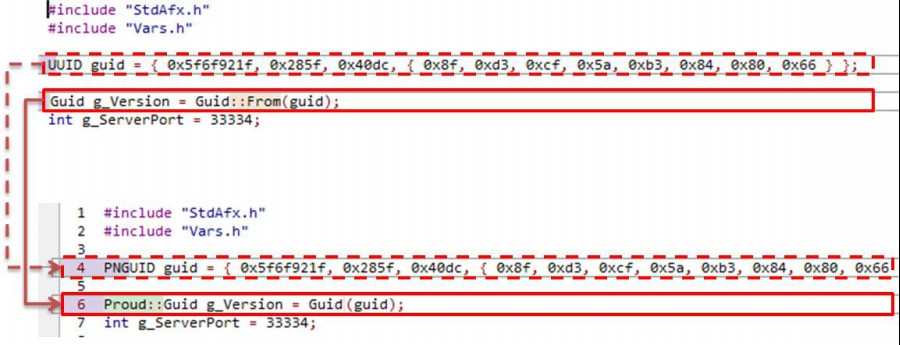
> * **LanCommon** → <mark style="color:orange;">NetCommon</mark>
> * **UUID** → <mark style="color:orange;">PNGUID</mark>
> * **Guid::From(guid)** → <mark style="color:orange;">Guid(guid)</mark>

<figure><img src="https://content.gitbook.com/content/hhO5qj4oN2uLfVC5EG5W/blobs/mdhxeM7wblBDi3VR4rrM/lan2net_1.png" alt=""><figcaption><p>LanToNet_Common_01</p></figcaption></figure>

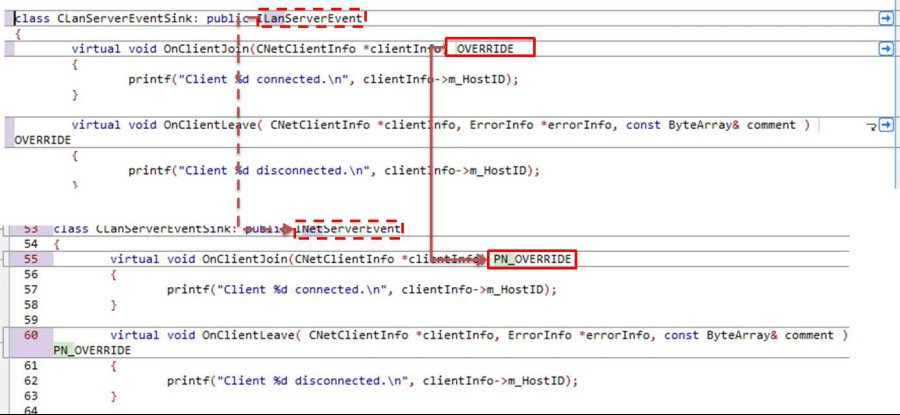
> * **LanServer** → <mark style="color:orange;">NetServer</mark>
> * **CLanServerEventSink** → <mark style="color:orange;">CNetServerEventSink</mark>
> * **OVERRIDE** → <mark style="color:orange;">PN\_OVERRID</mark>
> * **CLanServer** → <mark style="color:orange;">CNetServer</mark>
> * **CStartLanServerParameter** → <mark style="color:orange;">StartServerParameter</mark>
> * **p1.m\_tcpPort = g\_ServerPort** → <mark style="color:orange;">p1.m\_tcpPort .Add(g\_ServerPort)</mark>

<figure><img src="https://content.gitbook.com/content/hhO5qj4oN2uLfVC5EG5W/blobs/Loc5tIpnBWWMFHvKUhkq/lan2net_2.png" alt=""><figcaption></figcaption></figure>

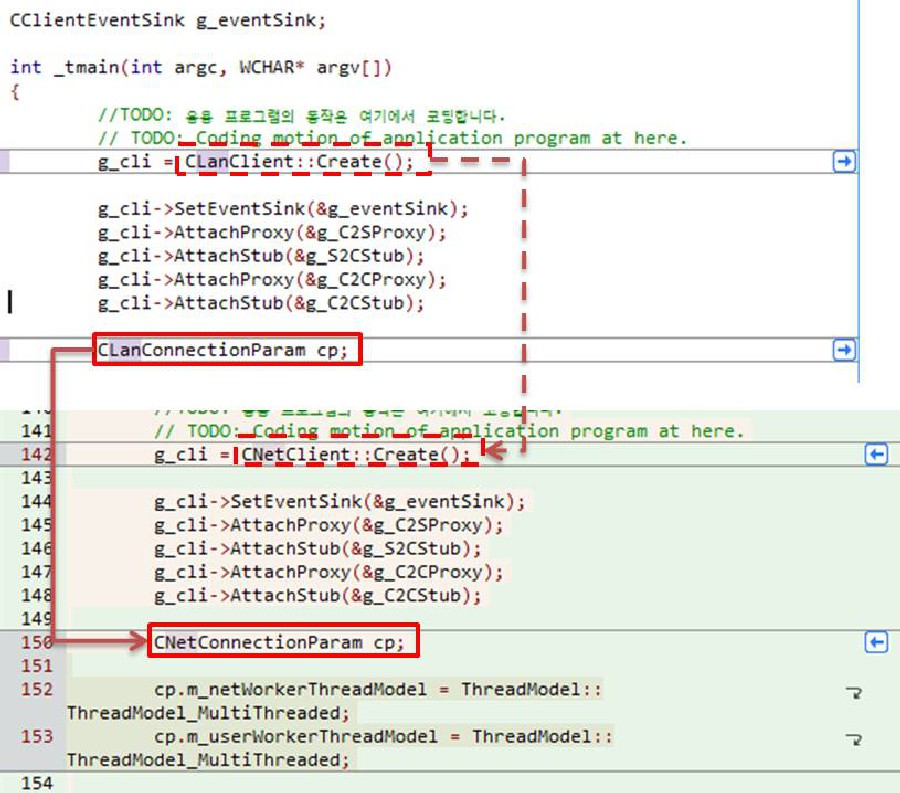
> * **LanClient** → <mark style="color:orange;">NetClient</mark>
> * **CLanClient** → <mark style="color:orange;">CNetClient</mark>
> * **ILanClientEvent** → <mark style="color:orange;">INetClientEvent</mark>
> * **OVERRIDE** → <mark style="color:orange;">PN\_OVERRID</mark>
> * **CLanClient::Create()** → <mark style="color:orange;">CNetClient::Create()</mark>
> * **CLanConnectionParam** → <mark style="color:orange;">CNetConnectionParam</mark>
> * **ProudNetServer.h** → <mark style="color:orange;">ProudNetClient.h</mark>

<figure><img src="https://content.gitbook.com/content/hhO5qj4oN2uLfVC5EG5W/blobs/btRsJ9Vt1MFEEZaKj4t1/lan2net_3.png" alt=""><figcaption></figcaption></figure>


---

# Agent Instructions: Querying This Documentation

If you need additional information that is not directly available in this page, you can query the documentation dynamically by asking a question.

Perform an HTTP GET request on the current page URL with the `ask` query parameter:

```
GET https://docs.proudnet.com/proudnet.cn/proudnet-note/notes/communcation_lan.md?ask=<question>
```

The question should be specific, self-contained, and written in natural language.
The response will contain a direct answer to the question and relevant excerpts and sources from the documentation.

Use this mechanism when the answer is not explicitly present in the current page, you need clarification or additional context, or you want to retrieve related documentation sections.