
ProudNet Server
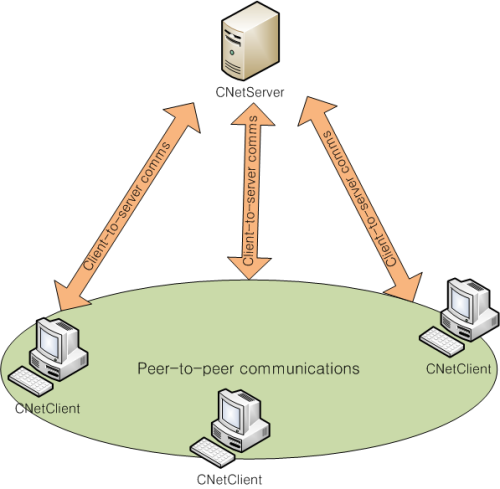
The ProudNet server is an instance of Proud::CNetServer and performs the following roles. It also acts as a relay server for P2P communication.
Accept and manage connections from ProudNet clients
Communicate with clients: RMI
Manage groups for P2P communication between clients: See P2P group
ProudNet Client
The ProudNet network client is an instance of Proud::CNetClient and has the following roles.
Connecting/disconnecting from the server: See Connecting to the server from a client
Communication with the server: RMI
P2P communication with other clients: RMI
ProudNet Protocol Types
The following messaging protocols are supported, and you can select one and put it as a parameter to your RMI function call.
| Protocol types | Description |
|---|---|
Reliable messaging | The time for sending and receiving messages between hosts is longer than Unreliable messaging, but the order and arrival is guaranteed. |
Unreliable messaging | The time for sending and receiving messages between hosts is shorter than Reliable messaging, but the order of sending and receiving messages may be distorted, and arrival is not guaranteed. |
Communication protocols used by the Client and Server
| Status | Reliable P2P RMI | Unreliable P2P RMI | Reliable C-S RMI | Unreliable C-S RMI |
|---|---|---|---|---|
Normal | Reliable UDP | UDP | TCP | UDP |
Poor UDP communication between peers | Relay and Reliable UDP or TCP | Relay and TCP | TCP | UDP |
Poor client-to-server UDP communication | Relay and TCP | Relay and TCP | TCP | TCP |
Reliable UDP is a ProudNet self-implemented feature.
Relay is handled by the Server.
Tips for choosing a protocol When developing the game for the first time, use Proud.RmiContext.ReliableSend to send all messages to Reliable messaging. And collect the history of sending and receiving RMI messages by referring to Accessing all RMI call points.
In a typical game program, 20% or fewer RMI message types account for 80% or more of the total sends and receives, so we look for RMIs that have a very high sending and receiving frequency and are okay with 20% or fewer losses and modify them to use Unreliable messaging.
ProudNet Client-Server Communication
In ProudNet, communication between client and server is done on a message-by-message basis, with each message corresponding to one RMI call, allowing for both reliable and unreliable communication.
ProudNet P2P Communication Performance
ProudNet is powerful because it goes beyond the ubiquitous hole punching and relaying techniques, and supports P2P reliable messaging like TCP with zero connection latency. It is tolerant of sensitive or faulty NAT devices, self-resolving overloaded P2P transmissions on low-speed Internet, and enforces messaging between clients immediately after a user requests a P2P communication connection (Proud.CNetServerCreateP2PGroup or Proud.CNetServer.JoinP2PGroup).
Some NAT devices lose external address mappings for the same internal address due to mismanagement; ProudNet minimizes this loss of mapping information by having different UDP sockets between clients and only attempting to hole-punch when absolutely necessary.
For example, if you have a P2P connection but are not actually communicating, you will not perform hole punching. Therefore, after calling Proud.CNetServer.CreateP2PGroup, Proud.CNetServer.JoinP2PGroup, the values of Proud.RmiContext.m_relayed, Proud.CNetClientInfo.m_RelayedP2P, and Proud.CNetPeerInfo.m_RelayedP2P will still be false, but will change to true when you start communicating.
On home computers with slower uploads compared to download speeds, such as ADSL or ADSL2+, hole punching may not be able to overcome the amount of traffic, causing the sending computer or NAT device on the sending end to fail.
In this case, ProudNet uses its built-in resolving capabilities to detect excessive sending from multicasting clients and distribute the multicast to relay servers.
A strategy for punching NAT holes is known as the "port prediction technique". This technique enables hole punching between symmetric NAT devices, but has the side effect of excessive port mapping. To minimize side effects, ProudNet initially refrains from excessive hole punching and then gradually switches to aggressive methods such as port prediction. Therefore, in some NAT devices, it takes a while to switch the route to direct P2P, but it is not a problem because it uses the hole-punching first and relay technique later.
ProudNet's performance with UDP communication
When using the UDP protocol, ProudNet employs techniques such as Coalesce and MTU discovery fail prevention to increase communication performance.
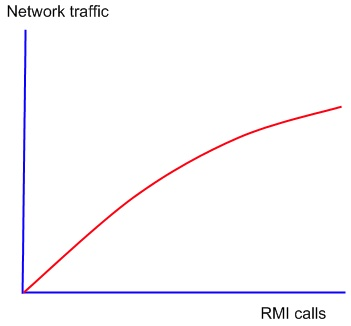
In low volume communications, such as LAN environments with latencies of 1 millisecond or less, the communication load appears to be greater than the actual RMI data capacity. However, in a WAN environment with increased communication volume or high latency, the communication load will be less than for low volume communication on a LAN.
In Internet communications over 100km away, packets must pass through many different types of gateway devices. Each gateway has a different tolerable MTU size, but if the sending side exceeds the defined MTU size, ICMP packet fragmentation occurs.
Some users are afraid of ICMP attacks and set it to block all kinds of ICMP packets, which can cause MTU discovery to fail because it cannot handle ICMP packet fragments, eventually breaking UDP communication between the two hosts.
ProudNet has features to prevent this.
Encrypted communication in ProudNet
ProudNet's encrypted communication protocol is very strong.
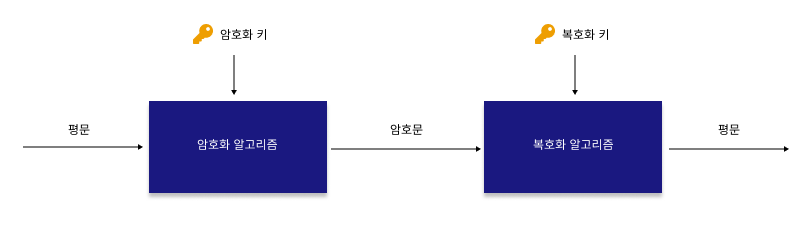
The message to be encrypted is encrypted with a symmetric key, and the symmetric key used at this time is encrypted with a public key and exchanged between hosts. These encryption keys cannot be hacked by third parties because they are assigned unique values not only in the server and client, but also in P2P communication between clients.
Encrypted messages are also significantly different in their internal content each time they are sent to another host, blocking hacking attempts to retransmit the same or similar message after packet capture. However, use them properly because they are slower to process than non-encrypted messaging.
ProudNet uses 128-bit RSA as its asymmetric key algorithm and AES or Fast as its symmetric key algorithm. RSA is too computationally intensive to use alone, so we use it in combination with a symmetric key algorithm.
This provides encryption not only for client-to-server communication, but also for P2P communication, making it highly secure. In addition, the symmetric key used in RMI are highly reliable because they are encrypted and exchanged with RSA algorithm public key during the initial server connection.
The custom fields in the Proud::INetServerEvent::OnConnectionRequest event, which occurs during the ProudNet client's connection to the server, are not encrypted. Do not pass user information through them.
- ProudNet Encryption Techniques
ProudNet offers different encryption capabilities based on performance and security levels. To send an encrypted message, you can select the desired encryption method in Proud.RmiContext.m_encryptMode as an argument to an RMI method call or SendUserMessage series method.
C++
Proud::RmiContext rmiContext;
rmiContext.m_encryptMode = Proud::EncryptMode::EM_Secure;
// Example of a proxy function
Proxy.RequestLogon(Proud::HostID::HostID_Server, rmiContext, m_Name, password);
Proud::RmiContext rmiContext;
rmiContext.m_encryptMode = Proud::EncryptMode::EM_Fast;
Proxy.RequestLogon(Proud::HostID::HostID_Server, rmiContext, m_Name, password);Alternatively, you can use it just as easily.
Proxy.RequestLogon(Proud::HostID::HostID_Server,Proud::RmiContext::SecureReliableSend, m_Name, password);
// Using EM_Secure
Proxy.RequestLogon(Proud::HostID::HostID_Server,Proud::RmiContext::FastEncryptedReliableSend, m_Name, password);
// Using EM_FastC#
Nettention.Proud.RmiContext rmiContext;
rmiContext.encryptMode = Nettention.Proud.EncryptMode.EM_Secure;
// Example of a proxy function
Proxy.RequestLogon(Nettention.Proud.HostID.HostID_Server, rmiContext, name, password);
Nettention.Proud.RmiContext rmiContext;
rmiContext.encryptMode = Nettention.Proud.EncryptMode.EM_Fast;
Proxy.RequestLogon(Nettention.Proud.HostID.HostID_Server, rmiContext, name, password);Proxy.RequestLogon(Nettention.Proud.HostID.HostID_Server,Nettention.Proud.RmiContext.SecureReliableSend, name, password);
// Using EM_SecureProxy.RequestLogon(Nettention.Proud.HostID.HostID_Server,Nettention.Proud.RmiContext.FastEncryptedReliableSend, name, password);
// Using EM_FastIf you are using the encryption feature in a P2P Group, you must set the value of CStartServerParameterBase::m_enableP2PEncryptedMessaging to true.
In C#, you can use StarSeverParameterBase.enableP2PEncryptedMessaging.
- Encryption key length: Balancing encryption level and performance
As part of ProudNet's encryption process, a key exchange takes place internally between hosts. The length of the exchanged keys can be set by the user, which should be set considering the performance of the system and the level of encryption.
The length of the encryption key can be set at server startup in the parameters Proud.CStartServerParameter.m_encryptedMessageKeyLength and Proud.CStartServerParameter.m_fastEncryptedMessageKeyLength.
Proud.CStartServerParameter.m_encryptedMessageKeyLength parameter
Refers to the length of the key when using AES encryption, and you can set the key length for Proud.EncryptLevel.EncryptLevel_Low, Proud.EncryptLevel.EncryptLevel_Middle, and Proud.EncryptLevel.EncryptLevel_High.
Proud.CStartServerParameter.m_fastEncryptedMessageKeyLength parameter
This is the length of the key when using the Fast method of encryption, and you can set the key length for Proud.FastEncryptLevel.FastEncryptLevel_Low, Proud.FastEncryptLevel.FastEncryptLevel_Middle, and Proud.FastEncryptLevel.FastEncryptLevel_High.
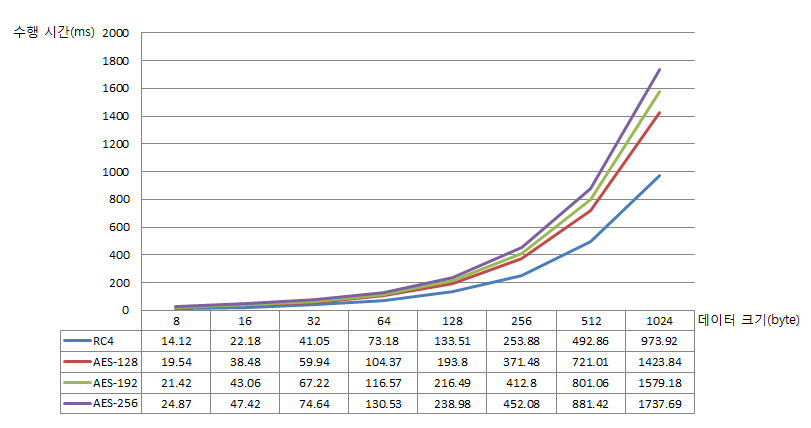
AES encryption is slightly slower than Fast, but provides a higher level of encryption.
However, for non-critical data like character movement messages, or messages that are sent and received a lot, you can use Fast, which has faster performance.
- Performance comparison of ProudNet's Fast AES algorithm
The following is a comparison of the performance of ProudNet's Fast AES algorithm, measuring the time it took to perform 100,000 decryptions using each algorithm, at one decryption per time.
Test specifications
| Items | Specification |
|---|---|
OS | Windows 7 Professional K |
CPU | Intel(R) Core(TM) i7-3770 CPU @ 3.40GHz 3.40GHz |
RAM | 16.0GB |
System type | 64-bit Operating System |
Reference
ProudNet message compression feature
In ProudNet, messages can be sent compressed, which is efficient by reducing the amount of communication and CPU usage on the host. To compress a message, set the argument Proud.RmiContext.m_compressMode to a value other than Proud.CM_None when calling an RMI method or when calling the SendUserMessage method.
C++
Proud::RmiContext rmi = Proud::RmiContext::ReliableSend;
rmi.m_compressMode = Proud::CompressMode::CM_Zip;

Proxy.SendFileChunk(Proud::HostID::HostID_Server, rmi, dataBlock);
C#
Nettention.Proud.RmiContext rmi = Nettention.Proud.RmiContext.ReliableSend;
rmi.compressMode = Nettention.Proud.CompressMode.CM_Zip;

Proxy.SendFileChunk(Nettention.Proud.HostID.HostID_Server, rmi, dataBlock);