
Client-to-client communication or peer-to-peer networking (hereinafter referred to as P2P communication) refers to direct communication between client hosts without going through a server.
This feature is useful in the following situations.
Too much data to communicate through the server
Clients are geographically close to each other, but the server is too far away
If you want less latency by networking directly between clients without going through a server
When synchronising movement between layers, the P2P feature can be used to reduce traffic on the server. However, on the flip side, a large number of P2P connections can lead to excessive traffic on the client, and there is always a risk of hacking, so important data such as attack determination should also be checked by the server.
At ProudNet, we manage everything on our servers, including group creation and ungrouping in P2P to make it more hack-proof.
To make a P2P connection, the server must first establish a P2P group between clients. Clients can only communicate with clients in the same P2P group as themselves.
Once the server establishes a P2P group between the clients, the clients will communicate via P2P relay through the server, while P2P hole punching between the clients takes place in the background. If P2P hole punching is successful, then from then on, communication between clients will be direct, bypassing the server. This is known as hole punching first, relay second. These features allow ProudNet to send and receive client-to-client messages as soon as a P2P group is formed or changed, and the ProudNet application does not require latency to start a game room. It also reliably performs frequent P2P connections and disconnections for location synchronisation between characters in the line-of-sight in MMORPG games.
If you start client-to-client communication as soon as you form a P2P group, the server will experience a temporary increase in server-side communication for a few seconds.
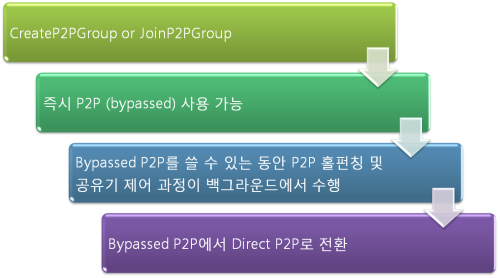
P2P communication between hole-punched clients is done over UDP and ProudNet's proprietary Reliable UDP, but until the hole-punching is successful, P2P relay is done over UDP or TCP. The UDP port used by the client for P2P communication is the same as the UDP port used to connect to the server.
In general, relay communication is more than twice as latent as P2P communication, especially the further apart the servers are in distance.
Reference
P2P Group
- Creating a P2P group
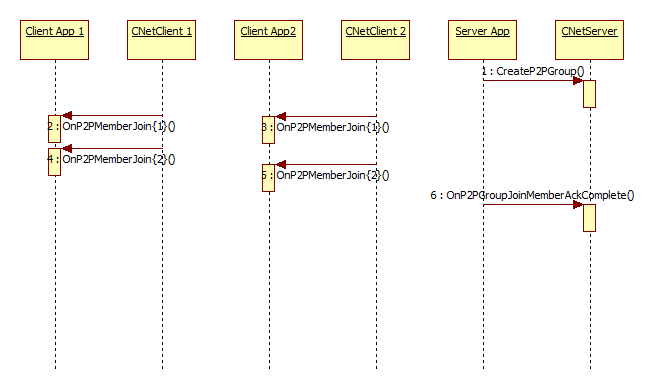
Before you can communicate P2P with other clients on ProudNet, you must create a P2P group on the server. When you create a P2P group on the server with Proud.CNetServer.CreateP2PGroup, clients will receive the event Proud.INetClientEvent.OnP2PMemberJoin for the HostID of clients who are members of the P2P group. After the client receives and processes this, the server receives Proud.INetServerEvent.OnP2PGroupJoinMemberAckComplete.
This event works well when the server wants to do something else after the clients have all detected a change in the P2P group.
- How to use
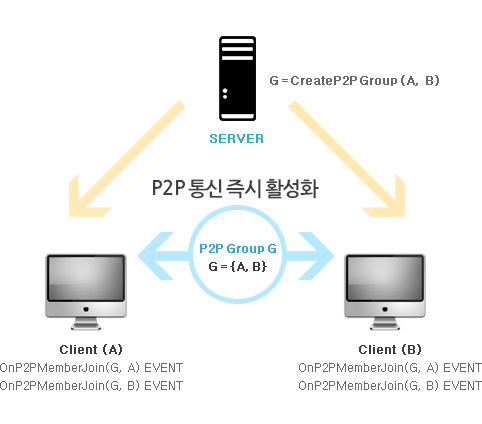
1. Create a P2P group by calling the CreateP2PGroup function on the server. 2. The client will receive a callback that the P2P group has been created via INetClientEvent::OnP2PMemberJoin. 3. The OnP2PMemberJoin function receives the HostID values of the clients and members that joined the group.
| Features | Callback | C++ function | C# function |
|---|---|---|---|
Adding a new member to a P2P group | Server | CNetServer::JoinP2PGroup | Nettention.Proud.NetServer.JoinP2PGroup |
Client | INetClientEvent::OnP2PMemberJoin | Nettention.Proud.NetClient.P2PMemberJoinHandler | |
Removing a new member from a P2P group | Server | CNetServer::LeaveP2PGroup | Nettention.Proud.NetServer.LeaveP2PGroup |
Client | INetClientEvent::OnP2PMemberLeave | Nettention.Proud.NetClient.P2PMemberLeaveHandler | |
Removing a P2P group | Server | CNetServer::DestroyP2PGroup | Nettention.Proud.NetServer.DestroyP2PGroup |
Client | INetClientEvent::LeaveP2PGroup | Nettention.Proud.NetClient.LeaveP2PGroup |
- Example usage
In-game viewgroup handling and chatting
| Functions | Description |
|---|---|
CreateP2PGroup | Connecting to a client, creating a chat group |
DestroyP2PGroup | When a client is disconnected and a chat group is removed |
JoinP2PGroup | When another user comes into view, when a new user enters the room |
LeaveP2PGroup | When another user moves out of view, or when an existing user leaves the room |