
Sending messages
When RMI Foo(int a,float b) is declared, if an RMI proxy is registered with the Client or Server, the proxy's RMI can be called to send a message. The messaging protocol can use either ReliableSend or UnreliableSend of the RmiContext. Both client-to-server and peer-to-peer communication are available.
Below is an example of sending a message.
C++
Proud::HostID oneHostID = ...; // 1 sending destination
int manyHostIDListCount = ...;

// Send RMI to the server.
myProxy.Foo(Proud::HostID_Server, Proud::RmiContext::ReliableSend, 3, 4);

// Send RMI to 1 sending destination.
myProxy.Foo(oneHostID, Proud::RmiContext::UeliableSend, 3, 4);
The destination can be the client's Host ID, the server's Host ID (Proud::HostID_Server), or yourself, and if you include a P2P group ID, it will be multicast to that P2P group. You can also multicast to multiple destinations at once. The first parameter is a pointer to an array of HostIDs instead of HostIDs and the size of the array of HostIDs.
// Array of sending destinations
Proud::HostID sendTo[2];
sendTo[0] = ...;
sendTo[1] = ...;

// Send to multiple recipients at once.
myProxy.Foo(sendTo, 2, Proud::RmiContext::ReliableSend, 3, 4);
If there are duplicate destinations in the list, they will only be sent once instead of twice, and the list can contain not only one host but also P2P groups.
C#
Nettetion.Proud.HostID oneHostID = ...; // 1 sending destination
int manyHostIDListCount = ...;

// Send RMI to the server.
myProxy.Foo(Nettention.Proud.HostID.HostID_Server, Nettention.Proud.RmiContext.ReliableSend, 3, 4);

// Send RMI to 1 sending destination.
myProxy.Foo(oneHostID, Nettention.Proud.RmiContext.UnreliableSend, 3, 4);
The destination can be the client's Host ID, the server's Host ID (Nettention.Proud.HostID.HostID_Server), or yourself, and if you add a P2P group ID, it will be multicast to that P2P group. You can also multicast to multiple destinations at once. You can do this by putting an array of HostIDs instead of HostIDs as the first parameter.
// Array of sending destinations
HostID[] sendTo = new HostID[2];
sendTo[0] = ...;
sendTo[1] = ...;

// Send to multiple recipients at once.
myProxy.Foo(sendTo, Nettention.Proud.RmiContext.ReliableSend, 3, 4);
Communication message size limits
ProudNet has a flexible size limit for communication messages, which is intended to prevent hacked clients from sending false signals to the server that they are unintentionally sending large messages.
For this reason, it is not recommended that game clients and servers communicate with each other to send and receive messages that are larger than about 64 KB.
The initial value for the maximum size of messages that can be sent and received is approximately 64 KB. However, server-to-server communication is immune to these hacking issues, server-to-server communication lines are lightning fast, and you will probably need to send and receive very large messages from time to time, which is why you might want to control the maximum size of messages in server-to-server communication.
This can be controlled via SetMessageMaxLength. If a client attempts to send a message larger than the specified size, an exception will be thrown at the corresponding sending point on the client end.
| C++ | C# |
|---|---|
Proud.CNetServer.SetMessageMaxLength | Nettention.Proud.NetServer.SetMessageMaxLength |
Auto-adjust sending volume (Throttling)
ProudNet features throttling which allows for less communication failure even in low-speed environments, and enables high-quality networking in high-speed environments.
- Message sending priority features
ProudNet provides a message sending priority feature.
If there are messages waiting in the egress buffer that have not yet been sent to the network line, priority 2 messages will be sent only after priority 1 messages have been fully sent. Similarly, messages at priority 3 will only start to be sent after messages at priority 2 are fully sent.
- Utilizing the message sending priority features
Voice Chat
Voice chat requires a large amount of messaging. Because the volume of voice chat communication can interfere with gameplay, it is recommended that messages related to gameplay be given a higher priority and voice chat a lower priority.
Download real-time content for games
You can develop games that require a quick install and then download the media data needed to start the game during gameplay. You can improve performance by giving higher priority to messages related to gameplay and lower priority to messages related to downloaded data.
Bulk character position synchronisation
Location synchronisation with characters that directly interact with the player character is more important than with other characters that do not interact directly, so sending the location of characters that are in combat with the player character or close to the camera at a higher priority and other messages at a lower priority can provide a better gaming experience.
When you call RMI, the input parameter RmiContext has a member variable priority. You can enter the message sending priority in this variable. The message sending priority is one of the values of Proud.MessagePriority.
Proud.RmiContext.ReliableSend and Proud.RmiContext.UnreliableSend are global variables. Do not modify their priorities directly; create separate RmiContext objects to use them.
- Sending only the final message
Sending final message only is a feature that sends duplicate messages, such as messages that have accumulated in the send queue but have not been sent, but only sends the final message you want to send and cancels the rest of the accumulated messages.
This is useful if you are playing an online game and want to send your character's location to another host.
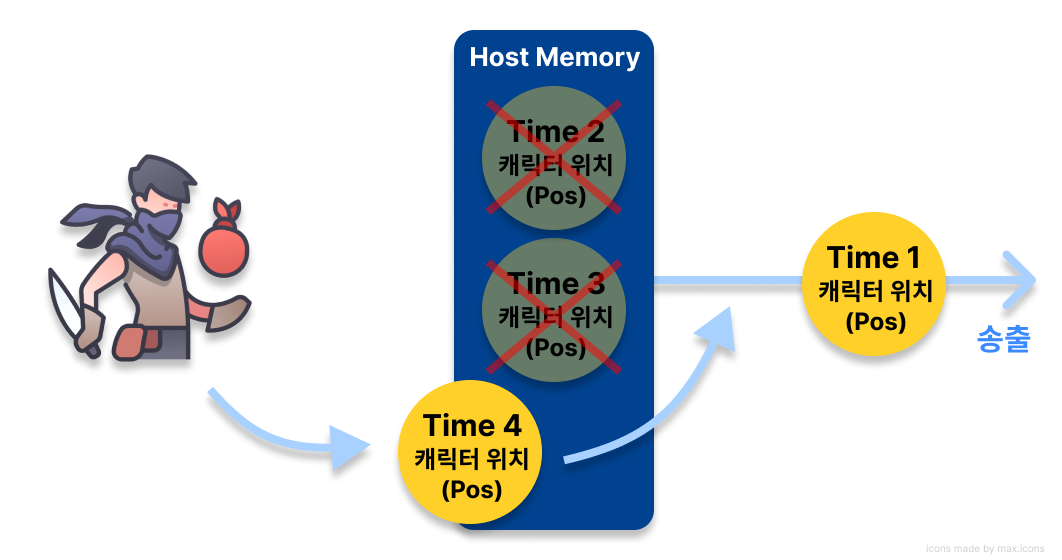
When the time 'Time' is 1, the character position (Pos) has already been sent to the communication line. And if the character's position at Time 2 and 3 has not been sent yet and is stored in the host's memory, and you want to send the latest position at Time 4, you do not need to send the character's position at Time 2 and 3, which are still waiting, so it is better to send the position at Time 4 without sending it.
How to use
You can do this by specifying a non-zero value for the member variable uniqueID of the parameter RmiContext that is passed in when calling RMI. If there is a message with the same uniqueID before this message is queued by the RMI call, the old message will be removed and replaced with the new message.
Because UnreliableSend is used in so many places, it is recommended that you create a separate RmiContext object and give it a uniqueID rather than using it directly.
Example usage
C++
// Proud.RmiContext.m_uniqueID Example usage
// Get a copy of the RmiContext object for the default unreliable send.
Proud::RmiContext rmi = Proud::RmiContext::UnreliableSend;

// In m_uniqueID, put the identifier of the character controlled by the localhost.
rmi.m_uniqueID = MyPlayerPetID;

// Send a message via RMI.
C2CProxy.MyRmiFunction(PeerHostID, rmi, blahblah);
C#
// Proud.RmiContext.m_uniqueID Example usage
// Get a copy of the RmiContext object for the default unreliable send.
Nettention.Proud.RmiContext rmi = Nettention.Proud.RmiContext.UnreliableSend;

// In uniqueID, put the identifier of the character controlled by the localhost.
rmi.uniqueID = MyPlayerPetID;

// Send a message via RMI.
C2CProxy.MyRmiFunction(PeerHostID, rmi, blahblah);
Detecting oversending
- Detect oversending on each host
ProudNet has a send queue internally. A send queue is "data to be sent" that waits in memory until the transmission is complete, when the amount of data you want to send is greater than the transmission rate the network line can handle.
The more you send, the more your send queue will continue to grow, so it is a good idea to measure your send volume to prevent it.
Send Queue Measurement Methods
| C++ | C# | Description |
|---|---|---|
Proud.CNetServer.GetClientInfo | Nettention.Proud.NetServer.GetClientInfo | Get information about the one peer associated with this object. |
Proud.CNetClient.GetPeerInfo | Nettention.Proud.NetClient.GetPeerInfo | Get information about the peer 1 associated with this object. |
Proud.CNetPeerInfo.m_sendQueuedAmountInBytes | Nettention.Proud.NetPeerInfo.sendQueuedAmountInBytes | Total amount of pending messages to be sent to the peer (in bytes)
|
When the sending volume is high, it can be mitigated by Throttling.
- Oversending detection for each RMI type
The event callback Proud.IRmiProxy.NotifySendByProxy that occurs for each RMI call has a parameter Proud.MessageSummary that allows you to measure the amount of RMI communication for each call.