
Download the ProudChat C++ SDK from the GitHub link below.
📂 C++ ProudChat SDK
Project settings
Copy the SDK file downloaded via git to the path of your root project and open the properties window for that project file in visual studio's solution explorer.
1. ProudNet Header file
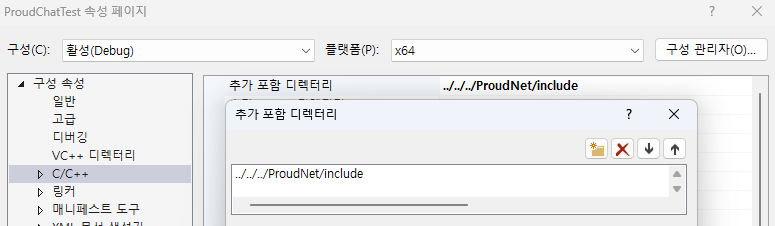
In the Properties window, under C/C++ -> Additional Include Directory -> add an include folder from the path to the folder where ProudNet is installed.
2. Set the path to the library <ProudNetClient.lib> directory
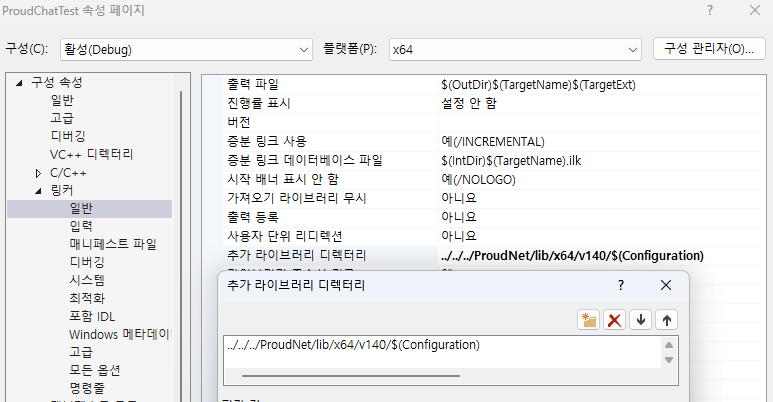
In the Properties window, under Linker -> General -> add the Debug or Release folder in lib / x64 / v140 from the path to the folder where ProudNet is installed.
3. Set library <ProudNetClient.lib> Dependencies
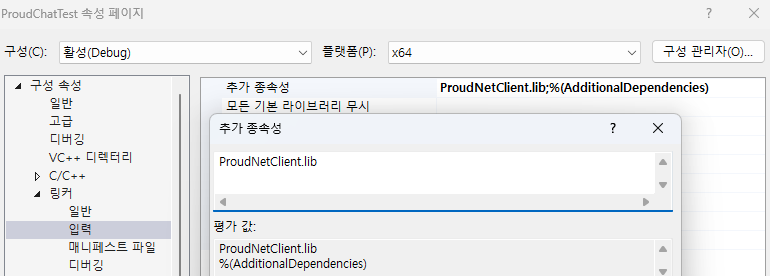
In the Properties pane, under Linker -> Input, add the ProudNetClient.lib file located in the library directory you added.
Set both the Debug and Release configurations.
4. Adding ChatClient
You can include ChatClient in your project by creating a ChatClient object and using it.
ChatClient object
- Creating
using namespace Proud;

ProudChat::CChatClient* chatClient = new ProudChat::CChatClient();
- ChatClient::Init
This is the part that initializes the ChatClient. The user must call the Init function to connect to the server before using it.
| Function Name | Parameters | Description |
|---|---|---|
Init | The user's UUID provided by the Proud Console, the UUID of the project created by the user, the user's own UniqueID, an event to be called on a successful server connection, and an event to be called on a failed server login | The user writes this part as a function to connect ChatClient to the server. As parameters, it receives a string required for project initialization (authUUID, projectUUID, uniqueID) and two events to check whether login is successful or failed. |
- ChatClient::Disconnect
| Function Name | Parameters | Description |
|---|---|---|
Disconnect | - | Use when you want to disconnect with the chat server. |
- ChatClient::FrameMove
The ChatClient has to call FrameMove on Update all the time.
- Function
| Function Name | Parameters | Description |
|---|---|---|
IsConnected | - | Use when you check the status of server connection. |
Join_Channel | Unique key for the channel you want to access | Use when you want to access a specific channel. |
Leave_Channel | Unique key for the channel you want to leave | Use this when you want to leave the channel you're in. |
Send_Direct_Msg | A unique identification value for a specific recipient, a message to send to the specific party | Use to send a message to a specific person. |
Send_Channel_Msg | A unique identification value for a specific channel, a message to send to the specific channel | Use to send a message to a specific channel. |
MsgTranslate | src = The country code of current language target = The country code of the targeting language msgKey = A unique key of message to translate msg = A message to translate | (Beta) Use when you want to translate the message |
MsgTranslate_Auto | target = The country code of the targeting language msgKey = A unique key of message to translate msg = A message to translate | (Beta) Request the translation of the message after automatically detecting the language. |
MsgRecord_Channel | channelKey = A unique key of the channel day = The days (max 90) cnt = The counts (max 100) | (Beta) Request the chat data from the Channel. Retrieve up to 100 messages within the last 90 days. |
MsgRecord_Direct | target = A unique key of the target user day = The days (max 90) cnt = The counts (max 100) | (Beta) Request the data from the Direct messages. Retrieve up to 100 messages within the last 90 days. |
MsgRecord_Notice | day = The days (max 90) cnt = The counts (max 100) | (Beta) Request the data from the Notice. Retrieve up to 100 messages within the last 90 days. |
- Event variable
| Event variable name | Description |
|---|---|
chatClientJoinCompleteDelegate | It will be called if the server successfully connects with the ChatClient. |
chatClientDisconnectDelegate | It will be called if the server disconnects with the ChatClient. |
chatClientJoinFailedDelegate | Variable will be called on server login failure. |
channelMsg_ResponseDelegate | It handles events that occur if a ChannelMsg arrives. |
directMsg_ResponseDelegate | It handles events if the Send-Msg arrives between users. |
noticeDelegate | It will be called when you send Notice from Proud Console. |
channelJoinSuccessDelegate | It will be called if Channel Join Success occurs. |
channelJoinFailedDelegate | It will be called if Channel Join Failed occurs. |
channelLeaveSuccessDelegate | It will be called if Channel Leave Success occurs. |
channelLeaveFailedDelegate | It will be called if Channel Leave Failed occurs. |
msgTranslateSuccessDelegate | (Beta) It will be called if the message is successfully translated. |
msgTranslateFailedDelegate | (Beta) It will be called if the message translation fails. |
msgRecordSuccessDelegate | (Beta) It will be called if the data history is successfully retrieved. |
msgRecordFailedDelegate | (Beta) It will be called if the data history retrieval fails. |