
Using collections
STL, ATL, etc. already provide collection classes (std.map, std.vector, CFastArray, CAtlArray, CAtlMap, etc.). However, ProudNet provides a set of classes that work well in situations where both STL and ATL are not available, or where high performance is required.
| Class | Function | Description |
|---|---|---|
Array Class | Proud.CFastArray | Internally, it uses a Fast heap. |
Linked List Class | Proud.CFastList | It uses Fast Heap internally. Unlike CFastArray, the class can be used with constructors, destructors, and copy allocation operators. |
Map Class | Proud.CFastMap | It uses a hash algorithm for (Key,Value) pairs. It is very similar in usage to CAtlMap, and can use the same iterators and some of the same methods as STL.map. |
Set Class | Proud.CFastSet | Unlike CFastMap, it is a class that only owns the key, the rest is the same as CFastMap. |
Quick Memory Manager
ProudNet has a built-in high-performance memory manager, which developers can use to accelerate the processing power of their applications.
The following memory managers are supported by ProudNet.
- Lookaside allocator
The lookaside allocator applies the usual memory pool technique. If you need to allocate and deallocate the same amount of memory frequently, you may want to use the lookaside allocator.
The main mechanisms are described below.
When allocating a new memory block, new system memory is allocated.
When freeing a block of memory, the freed block is returned to the lookaside allocator.
When reallocating memory blocks, the memory blocks returned by the lookaside allocator are recycled.
This process runs at a very high speed. It is much faster than memory allocation in the OS environment.
But there are also disadvantages.
A lookaside allocator can only allocate memory that is always the same size.
All memory blocks allocated by the lookaside allocator must be freed before the lookaside allocator is destroyed.
Here is how to use the lookaside allocator.
First, create an object with the Proud.CLookasideAllocator.New method. You can also create it as a global object.
Allocate a block of memory with the Proud.CLookasideAllocator.Alloc method.
Freeing is done with Proud.CLookasideAllocator.Free. Realloc does not exist.
Destroy the Proud.CLookasideAllocator object after freeing all memory blocks.
- Fast Heap
ProudNet's Fast heap is slightly slower than the Lookaside allocator, but much faster than memory allocation/release in the OS environment, and can allocate/release memory blocks of different sizes.
The implementation class for ProudNet's Fast heap is Proud.CFastHeap. Proud.CFastHeap also allows you to remove Proud.CFastHeap objects after all memory blocks have been destroyed.
Here is how to use Fast heap.
First, create a Fast heap object with the Proud.CFastHeap.New method. You can also create it as a global object.
Allocate a block of memory with the Proud.CFastHeap.Alloc method.
Freeing is done with Proud.CFastHeap.Free. Memory blocks can be reallocated with CFastHeap.Realloc.
Destroy the Proud.CFastHeap object after freeing all memory blocks.
Specify as default allocator for C++ class
An easy way to accelerate a fast heap or lookaside allocator in a C++ class is to override C++'s operator new, delete methods.
This ensures that when C++ classes are created and destroyed with the new, delete operators, the fast heap or lookaside allocator is used instead of the system's memory heap.
In the example below, when the class instantiates with the operator new or delete, we let the high-performance memory manager allocate/free memory on our behalf. There are different advantages and disadvantages to each, so choose and use accordingly.
➡️ Example
class Example
{
    static CLookasideAllocatorPtr gAlloc; // Alternatively, you can use CFastHeap.
public:
    void* operator new(size_t size)
    {
        return gAlloc->Alloc(size);
    }
    void operator delete(void* ptr, size_t size)
    {
        gAlloc->Free(ptr);
    }
};

CLookasideAllocatorPtr Example::gAlloc(CLookasideAllocator::New()); // Alternatively, you can use CFastHeap.
Smart Pointer
ProudNet has a smart pointer Proud.RefCount class.
A smart pointer guarantees the existence of a created object as long as there are variables referring to it, and only destroys it when the variables referring to it no longer exist.
It also serves to eliminate the problem of referencing objects that have already been destroyed due to developer-created bugs (dangling) or not destroying objects in time (leak).
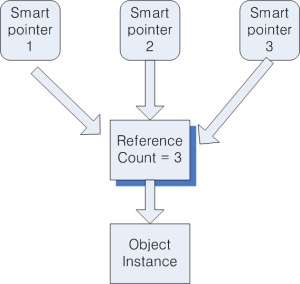
Each time a smart pointer variable is copied, the object reference count increases by 1. In the picture below, the Object Instance exists until the reference count becomes 0.
➡️ Example code
class A {...};

void Foo()
{
    // A object is created
    Proud::RefCount<A> a(new A);

    // Variable B is shared with variable A. A's reference count becomes 2.
    Proud::RefCount<A> b = a;

    // The variable A is freed. However, A is not destroyed because its reference count is still 1.
    a = Proud::RefCount<A>();

    // The variable B is freed. A is destroyed because there is no longer a variable referencing it. (i.e. delete is called)
    b = Proud::RefCount<A>();
}
There are times when you have multiple smart pointers referencing an object and you want to force the object to be destroyed.
For example, if a smart pointer is referencing an object that holds an open file handle, there will be times when you need to destroy the object that holds that file handle immediately.
However, if a smart pointer is referencing that object here and there, you may run into trouble because you do not know when the object is destroyed. For these cases, you can use the Dispose Pattern to explicitly destroy an object that is referenced in multiple places.
- Dispose Pattern
Dispose Pattern is a program pattern for achieving the effect of explicitly destroying an object referenced by one or more smart pointers without knowing exactly when the object will be destroyed.
To use the Dispose Pattern on an object that will be treated as a smart class, the object must have a "self-state" as a member variable, which means that the object has already been destroyed and is unusable. If the self-state is 'already destroyed', then we should raise an error when referencing the object, and otherwise make it perform normally.
Below is an example of using the Dispose Pattern.
Dispose Pattern is also covered in programming languages with smart pointer and Garbage Collector, such as Java and C#.
➡️ Example code
class A
{
    // If true, it means that this object is in the disposed state.
    bool m_disposed;
    public:

    A()
    {
        // Newly created objects are not disposed of.
        m_disposed = false;
    }

    ~A()
    {
        Dispose();
    }

    void Dispose()
    {
        if(m_disposed == false)
        {
            // Performs actual operations related to object destruction.
            // For example, close the file handle you were holding.
            ...

            m_disposed = true;
        }
    }
};

typedef Proud::RefCount<A> APtr;

void Foo()
{
    APtr a(new A); // Create an object
    APtr b = a;     // Two smart pointer variables share an object

    a->Dispose();   // Forcibly destroys the object.

    // Now both A and B objects are destroyed.
    // Therefore, the object being referenced by a,b should not be accessed.
    ...
}
Thread Utility
ProudNet offers several thread utility classes.
| Classes | Description |
|---|---|
Proud.Thread | Easily create and destroy threads. |
Proud.CriticalSection | You can create a critical section. |
Proud.CriticalSectionLock | You can lock and unlock. |
String Class
ProudNet provides string classes Proud.String, Proud.StringA that make handling strings as easy as the string classes in ATL or STL.
Programs that use the .Net Framework have a symbol called System.string. So if you are mixing .Net Frameworks, you may need to specify the namespace of either System or Proud.
For example, see below.
Proud::String a;  // Empty string
a = L"123";         // Putting a value in a string.
puts(a);            // A itself provides the string buffer directly.
a += L"abc";        // Adding another string to a string
if(L"123abc" == a)  // How to compare the contents of strings
{
    a.Replace(L"123", "def");   // Replace string contents
}
- String creation function(format)
Proud.StringT provides a string creation function like sprintf().
Proud::String a;
a.Format(L"%d %d %s", 1, 2, L"hahaha");
// Now a = "1 2 hahaha".
- Unicode-to-Multibyte Interconversion
- String processing performance
Copy-on-write
// Proud.StringT's copy-on-write feature only leaves a copy of the string if it is absolutely necessary.
// Before that, they will share string data with each other.

Proud::String a = L"abc"; // a owns the string 'abc'
Proud::String b = a; // b shares the same string data as a
Proud::String c = b; // Now a,b,c all share the same string data
c = L"bcd"; // a,b still share the string data ‘abc', but c no longer shares it and owns ‘bcd' separately
b = c; // b gives up sharing ‘abc' with a and shares ’bcd' with c.
Measuring String Length
Proud.StringT.GetLength returns the pre-measured length of the string immediately upon call, which is different from strlen().
Proud.StringT does not have a thread safe like int or float. Therefore, it is not safe to access the same string object from multiple threads at the same time (unless all threads are read only).
This is the same as for string classes in ATL or STL.
Timer Queue
Timer Queue is a module that performs tick event on a thread pool and provides an API called Windows Timer Queue on Windows XP, 2000 and later operating systems.
Run a function you specify at a certain time, but the function runs on one of the threads in the thread pool. If all the threads are running something (in a running state), the execution of the function is put on hold until one of the threads finishes its past work.
The user function calling from the Timer Queue will be selected from one of the threads in the thread pool, and if there is a thread with nothing to do (idle state), it will be selected to execute the user function, even if the user function that was running earlier has not finished executing.
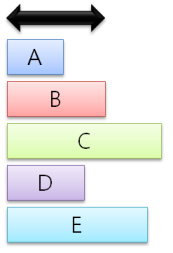
Suppose you have the following task list.
The black arrow is 0.1 seconds and A,B,C,D,E are the action items that need to be done every 0.1 seconds. A,D will be done in less than 0.1 seconds, B will be done in exactly 0.1 seconds, and C,E will not be done in 0.1 seconds.
In the server main loop approach, these work items are performed as shown in the following figure. Because it executes all work items in one thread, D,E does not start in time.

However, in the Timer Queue approach, another thread is mobilized to execute D, and E is running in time on the thread that completed C earlier.
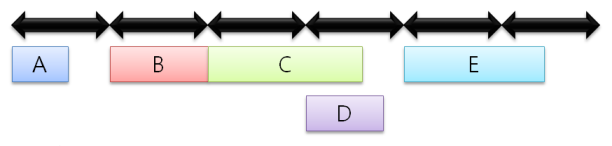
Execute the necessary tasks on time, but mobilize more threads if necessary.
Timer Queue is primarily used in server programs due to the fact that user functions can be running on more than one thread at the same time.
While it enables parallelism, it comes with its own set of risks, so determine if you really need this feature before using it.
If Timer Queue is used incorrectly, the number of threads in the server process may increase explosively, which may have an adverse effect on performance. If there is no compelling reason to use Timer Queue, use Proud.CTimerThread or handle timer loop, RMI, and events on the server.
- How to use a timer queue
You need to access the Proud.CTimerQueue class, which is a singleton.
You can set the function to be called at a certain time and how often it will be called in a Proud::NewTimerParam structure and pass it as an argument to Proud.CTimerQueue.NewTimer and you will receive a Proud.CTimerQueueTimer object. And until you destroy the Proud.CTimerQueueTimer object, the user function you specify will be executed at regular intervals.
➡️ Example code
VOID NTAPI UserFunction(void* context, BOOLEAN TimerOrWaitFired)
{
    int *pCallCount = static_cast<int *>(context);

    // User Functions
    std::cout << "UserFunction : " << ++(*pCallCount) << std::endl;
}

int _tmain(int argc, TCHAR* argv[])
{
    // NewTimerParam structure variable declaration.
    NewTimerParam p1;

    // Declare a variable for counting in your test
    int callCount = 0;

    // Setting up user functions.
    p1.m_callback = UserFunction;

    // Set the pointer to receive as a parameter.
    p1.m_pCtx = &callCount;

    // Set the callback to start after 1 second.
    p1.m_DueTime = 1000;

    // Set to callback every 0.1 seconds.
    p1.m_period = 100;

    // Have a user function called every 0.1 seconds on a pool of threads at a certain time.
    Proud::CTimerQueueTimer* ret = Proud::CTimerQueue::GetSharedPtr()->NewTimer(p1);

    std::cout << "PRESS ANY KEY TO EXIT" << std::endl;

    // Wait for the user callback to be called
    _getch();

    // Destroy the timer object. After destroying it, the user function is no longer called.
    delete ret;
}
Leaving a log
When developing an online game, you may need the ability to leave various execution records (logs). ProudNet provides the ability to leave logs for this purpose.
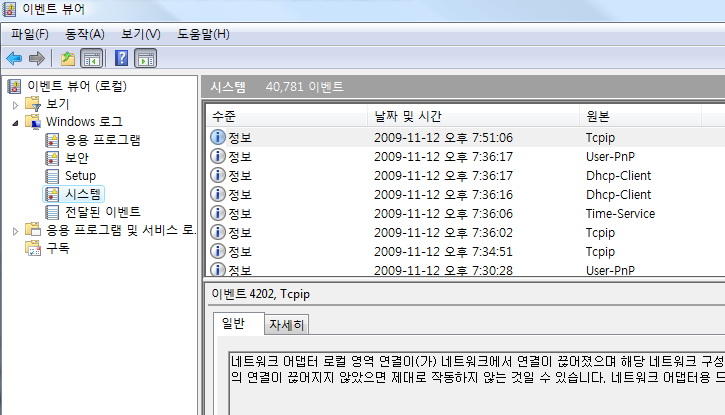
ProudNet's logging function runs asynchronously, so the method returns as soon as you call the method to leave a log. Additionally, a separate thread writes the actual log to a file or database.
- Logging to a file
The Proud::CLogWriter class allows you to write logs to a file.
➡️ Example code
// Create a CLogWriter.
CAutoPtr<Proud::CLogWriter> logwriter;
logwriter.Attach(Proud::CLogWriter::New(L"log.txt"));

// Let's write a log. It provides two WriteLine functions
logwriter->WriteLine( Proud::TraceID::TID_System, L"This is the system log. );
logwriter->WriteLine( "This is the %dth log.", 1 );

// Let's replace it with a new log file. If the creation of the new file fails, it will be exceptioned with Proud::Exception.
logwriter->SetFileName(L"log2.txt);
- Logging to a database
The Proud::CDbLogWriter class allows you to write logs to the DB.
To use this, you must create a LogTable in advance by running LogTable.sql in the Sample/DbmsSchema folder. To build a DBMS, refer to the procedure in Building a Sample Database.
➡️ Example code
// A function to receive and handle errors.
class CTestLogWriterDelegate : public ILogWriterDelegate
{
    virtual void OnLogWriterException(Proud::AdoException& Err) override
    {
        // ...
    }
};

CTestLogWriterDelegate g_dblogDelegate;

void main()
{
    // ...
    // Fill in the CDbLogParameter with a value.
    Proud::CDbLogParameter dbparam;
    dbparam.m_dbmsConnectionString = L"Data Source=localhost;Database=Log-Test;Trusted_Connection=yes";
    dbparam.m_loggerName = L"LoggerName";
    dbparam.m_dbLogTableName = L"DbLog";

    // Create a CDbLogWriter.
    CAutoPtr<Proud::CDbLogWriter> dbLogWriter;
    dbLogWriter.Attach(Proud::CDbLogWriter::New(dbparam, &g_dblogDelegate));

    // Let's add a new field that ProudNet doesn't provide.
    // Caution!!! If you want to add your own fields, you need to create them in the Log-Test Table in the DBMS.
    // If you create a TestField in the DBMS and the datatype is int, you can create a CPropNode and put it in the WriteLine like the syntax below.
    Proud::CProperty newnode;
    Proud::String TestField = L"TestField";
    Proud::CVariant TestValue = 123;
    newnode.Add(TestField, TestValue);
    dbLogWriter->WriteLine(L"The contents of the log.", &newnode);

    // ...
}
Latency Measurement Features
ProudNet provides latency measurement in the form of StopWatch.
If it is available, you should use it instead of the server's GetLastPing or GetRecentPing, as it is more accurate than traditional latency measurement functions.
(1) Start measuring latency
Calling StartRoundTripLatencyTest starts the object and relay for measuring latency.
➡️ Example code
StartRoundTripLatencyTestParameter testParameter;
testParameter.testDuration = 40 * 1000; // A variable that specifies how long to wait for StopRoundTripLatencyTest to be called in the middle of a RoundTripLatencyTest. The unit is milliseconds. It defaults to 500 ms.
testParameter.pingIntervalMs = 400; // Variable that specifies how often to ping during the RoundTripLatencyTest. The unit is milliseconds. It defaults to 300 ms.
ErrorType startError = netClient->StartRoundTripLatencyTest(HostID_Server, testParameter);
switch(startError)
{
    case ErrorType_Ok:
        std::cout << "success" << std::endl;
        break;
    case ErrorType_InvalidHostID:
        std::cout << "If the HostID is itself or is not a connected peer" << std::endl;
    break;
}
(2) End of latency measurement
If you want to stop the test before the previously specified testDuration, call the StopRoundTripLatencyTest function. If you do not call StopRoundTripLatencyTest until the testDuration has passed, the measurement will automatically stop.
➡️ Example code
ErrorType stopError = StopRoundTripLatencyTest(HostID_Server);
switch(stopError)
{
    case ErrorType_Ok:
        std::cout << "success" << std::endl;
        break;
    case ErrorType_InvalidHostID:
        std::cout << "If it is not a connected peer" << std::endl;
        break;
}
(3) Getting latency measurements
➡️ Example code
RoundTripLatencyTestResult testResult;
ErrorType getError = GetRoundTripLatency(HostID_Server, testResult);
switch(getError)
{
    case ErrorType_Ok:
        std::cout << "Success" << std::endl;
        std::cout << "Ping-pong average over the measurement period : " << testResult.latencyMs
<< ", Ping-pong standard deviation over the measurement period : " << testResult.standardDeviationMs
<< ", Number of ping-pongs executed during the measurement period : " << testResult.totalTestCount << std::endl;
        break;
    case ErrorType_InvalidHostID:
        std::cout << "If you are not a connected peer" << std::endl;
        break;
    case ErrorType_ValueNotExist:
        std::cout << "If the ping-pong never happened" << std::endl; // In this case, the totalTestCount of the RoundTripLatencyTestResult is 0.
        break;
}
PIDL Compiler Add-on
This is an add-on for Visual Studio that allows you to easily set up Custom Build from ProudNet IDL (PIDL) files.
- Setting
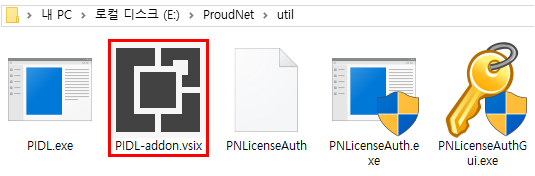
1. Run <installation path>\ProudNet\util\PIDL-addon.vsix.
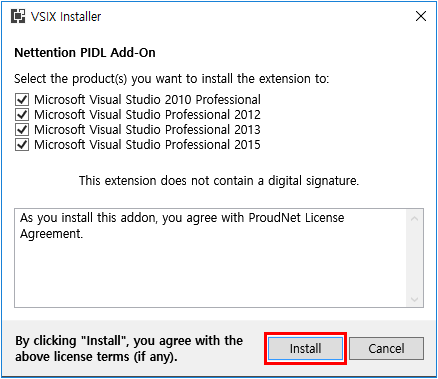
2. Select the Visual Studio you want to install the add-on to and proceed to Install.
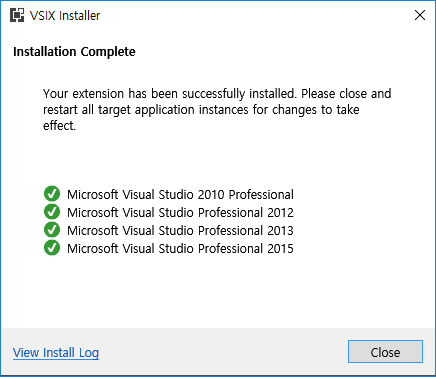
3. When installation is completed successfully, it will be displayed as shown below.
- Delete
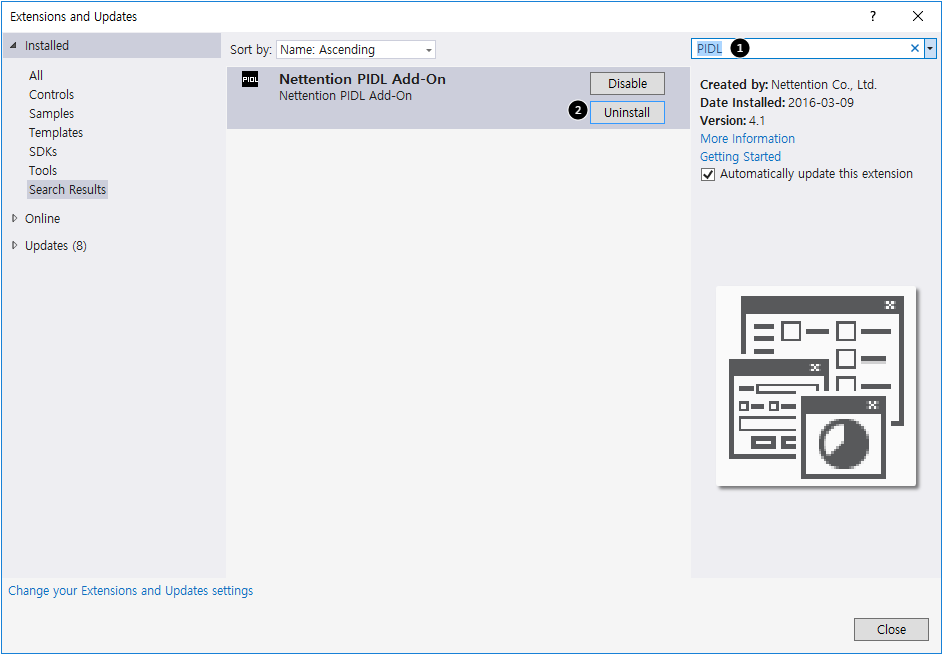
You can uninstall it through the Tools → Extensions and Updates menu.
For Visual Studio 2010, click Tools → Extension Manager
- Add PIDL File Window
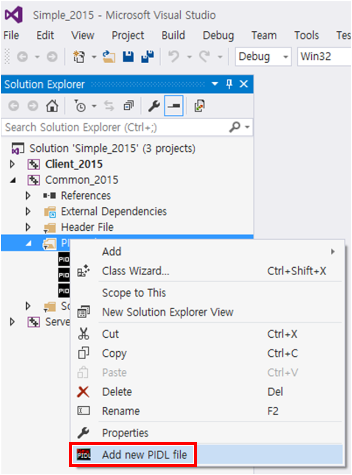
Call the Add PIDL window. Select Project → right click → select Add new PIDL file
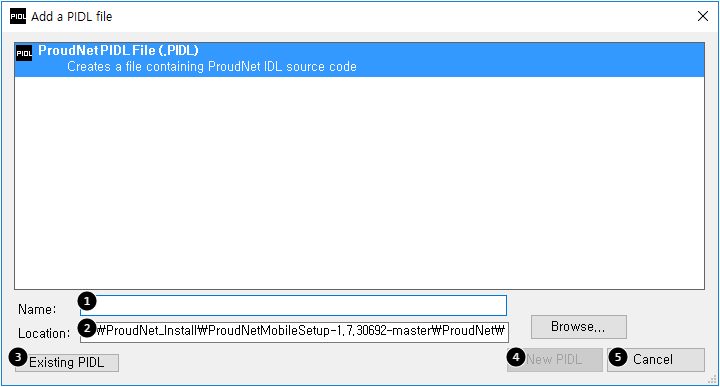
Enter a PIDL file name.
Displays the path where the PIDL file will be added.
Add an external PIDL file.
Create a new PIDL file.
Exit the Add PIDL window.
- Add a PIDL file
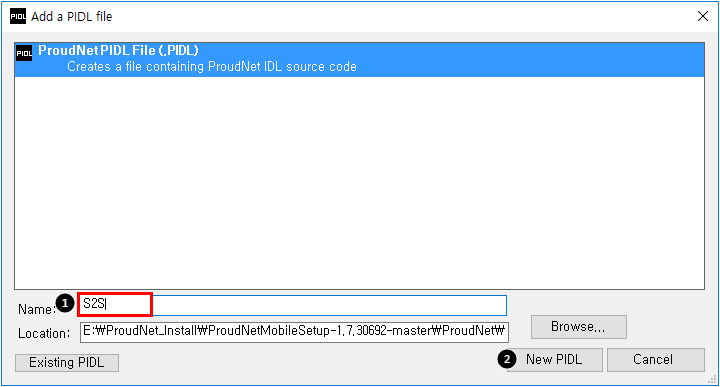
Enter the name of the PIDL file to add
Click New PIDL
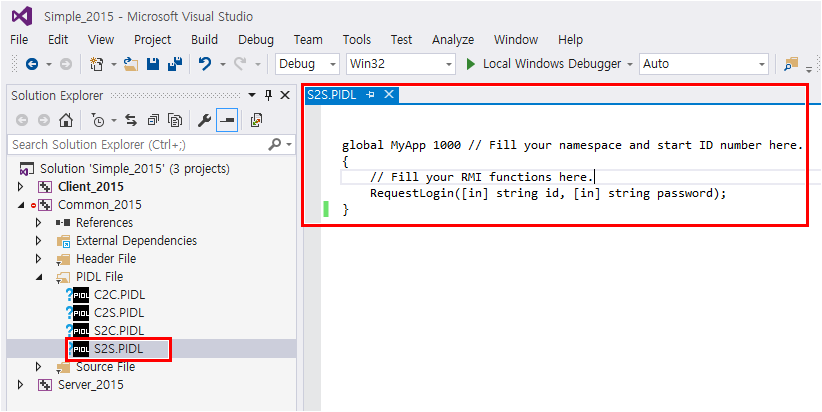
A PIDL file is added, as shown above, and the Custom Build settings for that file are by default. If they differ from the default settings, you can change them via the Change File Properties feature.
- PIDL File Properties Window
Call the PIDL Properties window.
Select PIDL file → right click → select Properties
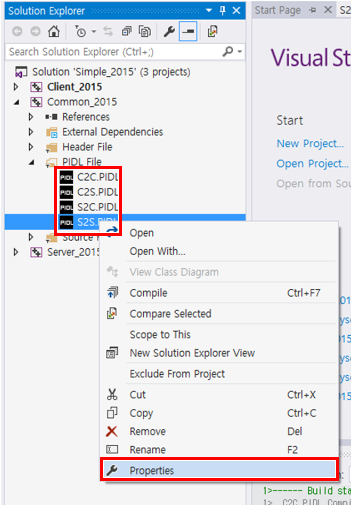
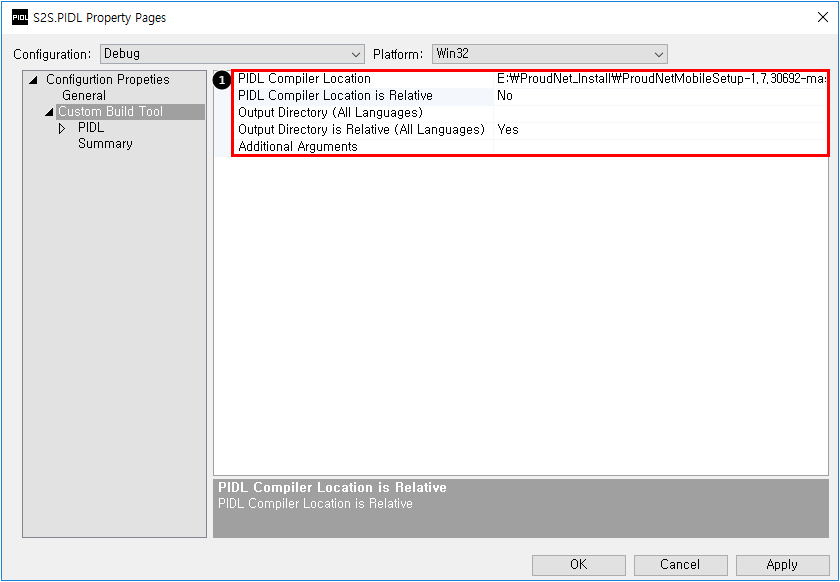
View/change the Custom Build Tool settings in the PIDL file. PIDL Compiler Location: Set the PIDL compiler location. PIDL Compiler Location is Relative: The absolute/relative value of the entered path. Output Directory (All Languages): Set the output path. Output Directory is Relative (All Languages): The absolute/relative value of the entered path.
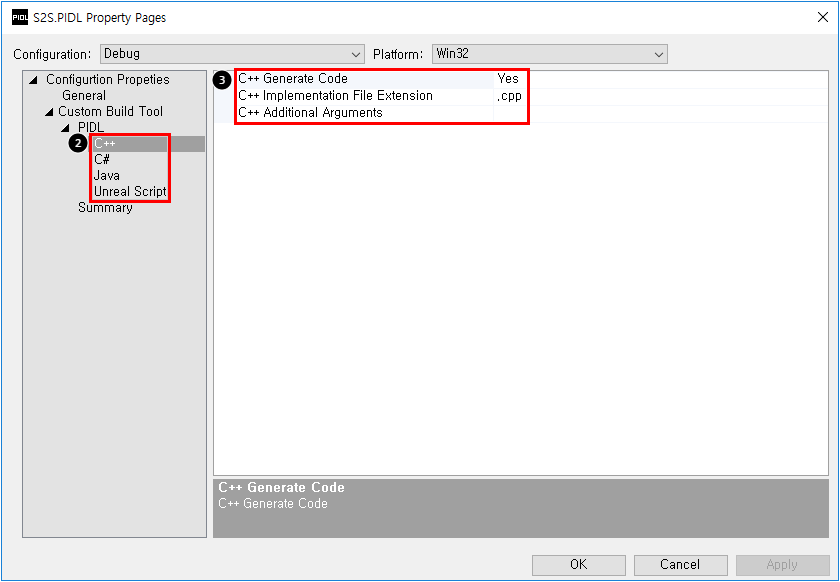
Language-specific settings windows: These can be created for each of the C++, C#, Java, and Unreal Script languages.
Language-specific settings window: Generate Code: C++ default Yes, other languages False (can be set as needed) C++ Implementation File Extension: C++ only.