LanServer, LanClient have been retired since version 1.7. NetServer, NetClient take over the roles of LanServer, LanClient.
Reference Migration from ProudNet 1.6 Lan Module to 1.7 Net Module
Features of LAN communicators
The difference between a ProudNet server and a LAN communicator between the network and the server is as follows.
| Sections | ProudNet Server and Network | Server-to-Server LAN Communicator |
|---|---|---|
Key uses | Common user applications communicate with the server | Communication between servers in a distributed server structure |
NNAT Device Transmission | YES | NO |
P2P relay(relay) | YES | NO |
Client-to-server communication protocols | TCP and UDP | TCP |
P2P communication protocols | (Reliable) UDP | TCP |
Client's callback method | Poll (Callback from Proud.CNetClient.FrameMove) | Callbacks from a thread pool |
lan_main provides high-speed communication between hosts as follows.
Because it only uses TCP, it uses the server hardware's communication acceleration (TCP Offload Engine).
Unlike Client, events and incoming messages are callbacked on a thread pool. Of course, the server side also fires callbacks from the thread pool.
Using LAN communicators
The usage of the ProudNet server and the network and LAN communicators is almost identical.
The following are API differences.
| Sections | ProudNet Server and Network | Server-to-Server LAN Communicator |
|---|---|---|
Server | Proud.CNetServer | Proud.CLanServer |
Client | Proud.CNetClient | Proud.CLanClient |
Server event handler | Proud.INetServerEvent | Proud.ILanServerEvent |
Client event handler | Proud.INetClientEvent | Proud.ILanClientEvent |
Message pool method | Proud.CNetClient.FrameMove | None (callback in thread pool) |
P2P communication on LAN communicators
For P2P communication between Proud.CLanClient hosts, the TCP protocol is used.
When P2P messaging is initiated by Proud.CLanServer.CreateP2PGroup, for example, as soon as P2P communication between hosts is established, the message you want to send is stored in each host's local queue until the TCP connection between peers is established. The stored messages will start sending immediately as soon as the TCP connection is established.
As soon as a TCP connection is established, Proud.ILanClientEvent.OnP2PConnectionEstablished and Proud.ILanServerEvent.OnP2PConnectionEstablished are called.
On the other hand, when the TCP connection is disconnected, Proud.ILanClientEvent.OnP2PDisconnected and Proud.ILanServerEvent.OnP2PDisconnected are called.
Proud.ILanClientEvent.OnGroupP2PConnectionComplete and Proud.ILanServerEvent.OnGroupP2PConnectionComplete are called when all members in the P2P group have established a TCP connection.
Thread pool on LAN communicators
Proud.CLanClient does not have a corresponding function for Proud.CNetClient.FrameMove because event callbacks and RMI callbacks occur on threads in the thread pool, which is prepared by Proud.CLanClient.
Proud.CLanConnectionParam.m_netWorkerThreadCount allows you to specify the number of threads in the thread pool that the client should have.
Handling disconnections from LAN clients
Because the LAN client creates a user worker thread pool during the connection process (CLanClient.Connect) and removes that pool during the disconnection process (CLanClient.Disconnect), the LAN client cannot issue disconnect or connect commands on user worker thread.
If implemented, Proud.Exception will occur.
RMI on LAN communicators
This is the same as using RMI.
Synchronizing time in server-to-server communication
It is the same as how to get server time from the client.
Migration from ProudNet 1.6 Lan Module to 1.7 Net Module
- Precautions when changing from 1.6 Lan Module to 1.7 Net Module
Requires a thread model specification when calling NetClient.Connect().
When calling, you must put a parameter in the m_userWorkerThreadModel to allow the user callback to be received by multiple threads.
Or, attach the thread pool object you created to the m_externalUserWorkerThreadPool parameter.
This thread pool has multiple threads.
C++
void CFarmClient::Connect()
{
    CNetConnectionParam p1;
    p1.m_protocolVersion = CFarmSettings::GetSharedPtr()->GetFarmVersion();
    p1.m_serverIP = L"localhost";
    p1.m_serverPort = CFarmSettings::GetSharedPtr()->GetFarmServerPort();
    p1.m_timerCallbackIntervalMs = 1000;

    // To handle event processing for m_lanClient in the user worker thread pool.
    // And to avoid having to call FrameMove.
    p1.m_userWorkerThreadModel = ThreadModel_MultiThreaded;

    // The outerror will only point to the ErrorInfo allocated on the heap when an error occurs.
    // If you want to use an outerror after the Connect call, you must check if it is NULL before using it.
    ErrorInfoPtr outerror;
    m_lanClient->Connect(p1, outerror);
}
Communication between servers has changed from traditional TCP communication to UDP-based communication, which requires firewall work around UDP ports.
- How to change from 1.6 Lan Module to 1.7 Net Module
1.7 Prepare the library. The library is located in <install folder>/ProudNet/lib/.
Change the function name from Lan to Net. This includes all classes, functions, and methods. Most are a 1:1 match, so you shouldn't have to make any major changes.
- Example of migrating a 1.6 Sample/SimpleLan example to 1.7
LanCommon → NetCommon
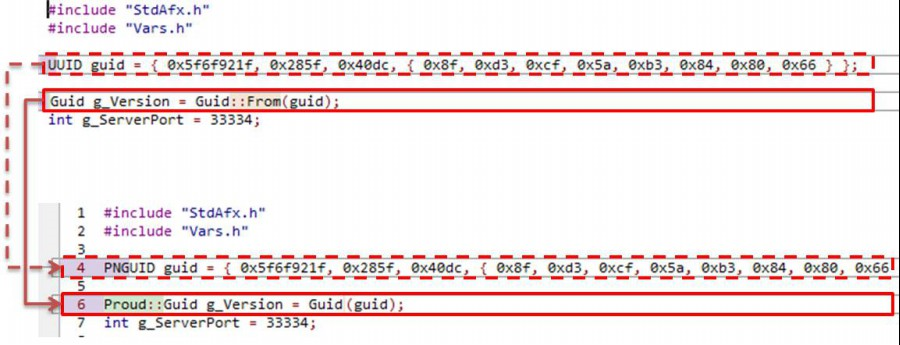
UUID → PNGUID
Guid::From(guid) → Guid(guid)
LanServer → NetServer
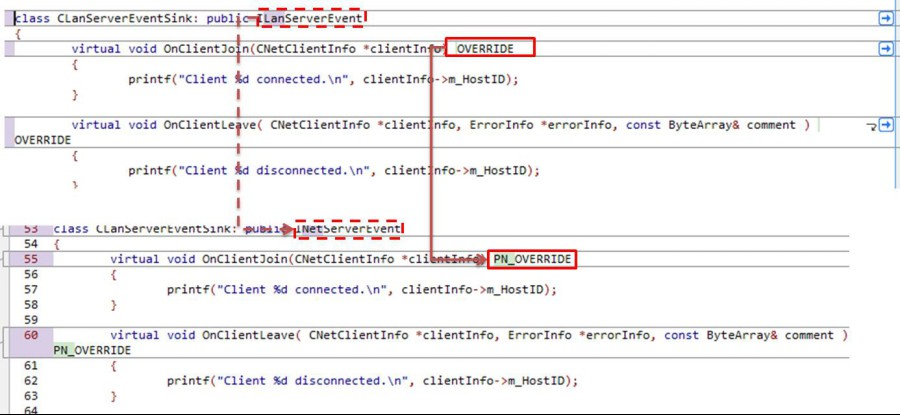
CLanServerEventSink → CNetServerEventSink
OVERRIDE → PN_OVERRID
CLanServer → CNetServer
CStartLanServerParameter → StartServerParameter
p1.m_tcpPort = g_ServerPort → p1.m_tcpPort .Add(g_ServerPort)
LanClient → NetClient
CLanClient → CNetClient
ILanClientEvent → INetClientEvent
OVERRIDE → PN_OVERRID
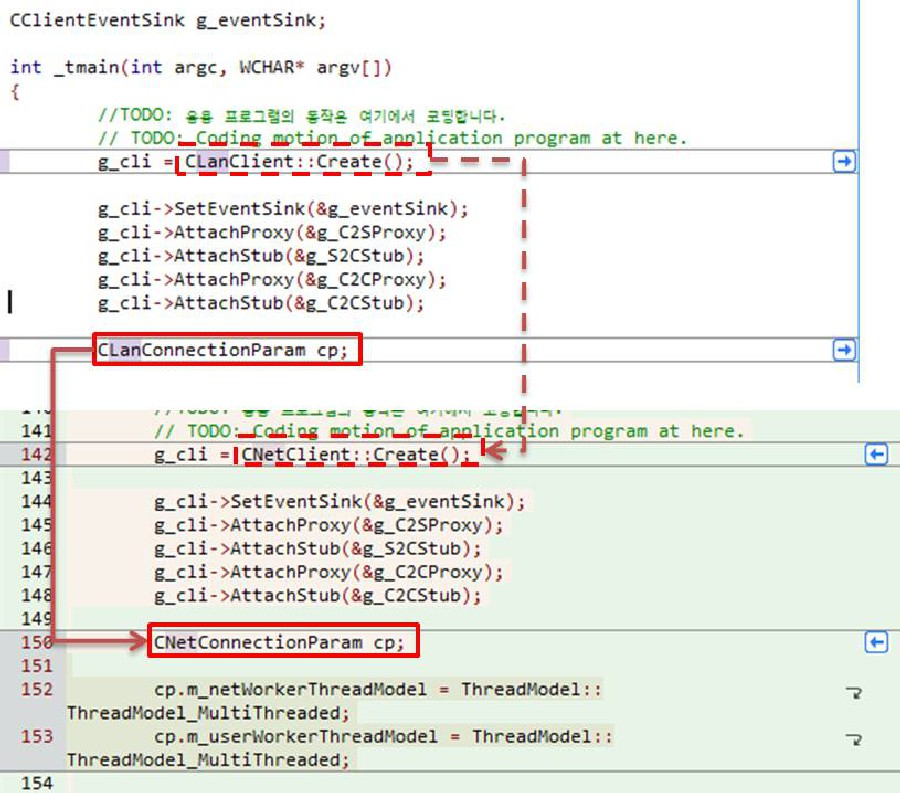
CLanClient::Create() → CNetClient::Create()
CLanConnectionParam → CNetConnectionParam
ProudNetServer.h → ProudNetClient.h