# DB Cache 安裝和網絡設置

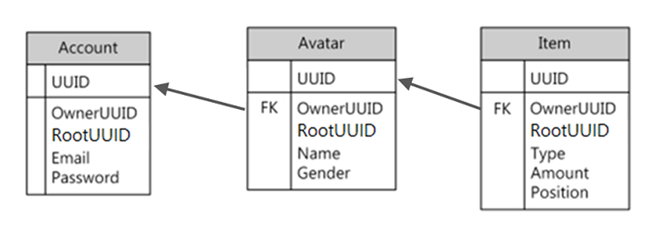
## DB cache 的遊戲資料庫架構

DB cache的數據庫方案可以按照用戶的意願配置。

但是，要遵守以下規則。

> * 您必須進入 RootUUID、 OwnerUID 和 UUID 字段 。
> * 將RootUUID、OwnerUID、UUID指定爲<mark style="color:orange;">Combination PK</mark>後使用，會對使用索引的搜索產生不利影響。 因此，創建和使用各自的index有助於提高性能。
> * 在上述字段中的RootUUID和OwnerUID被指定爲<mark style="color:orange;">Non-Unique Index</mark>。 UUID 被指定爲 Primary Key 。
> * 上述字段應爲MySQL至varchar(38)格式,MSSQL爲<mark style="color:orange;">uniqueidentifier</mark>格式。
> * Root table和Child table的名稱不應重複。
> * DB cache客戶端和服務器使用的<mark style="color:orange;">stored procedure</mark>會自動添加到遊戲數據庫方案，請不要修改或刪除這些方案。

<figure><img src="/files/57JgrNm8073Fc8LOXwYR" alt=""><figcaption><p>MMORPG中保存玩家數據的數據庫方案的示例</p></figcaption></figure>

**3 個必需索引添加示例腳本**

```sql
ALTER TABLE dbo.Gamer ADD CONSTRAINT
 
PK_Gamer PRIMARY KEY CLUSTERED
 
(
 
UUID
 
) WITH( IGNORE_DUP_KEY = OFF) ON [PRIMARY]


CREATE INDEX IX_Gamer_OwnerUUID ON dbo.Gamer
 
(
 
OwnerUUID
 
) WITH( IGNORE_DUP_KEY = OFF) ON [PRIMARY]


CREATE INDEX IX_Gamer_RootUUID ON dbo.Gamer
 
(
 
RootUUID
 
) WITH( IGNORE_DUP_KEY = OFF) ON [PRIMARY]
```

## DB cache 服務器準備

生成數據庫方案後，需要生成DB cache server實例，是<mark style="color:orange;">Proud.CDbCacheServer2</mark>類型，實例在每個遊戲服務器之間只需1個。

<table><thead><tr><th width="305">實例</th><th>註釋</th></tr></thead><tbody><tr><td>Proud.CDbCacheServer2.New</td><td>創建實例</td></tr><tr><td>Proud.CDbCacheServer2.Start</td><td>執行</td></tr></tbody></table>

> * 連接DB實例的連接連接是ADO連接連接連接形式，樣品中可參考。
> * DB cache server 的認證 key 是 DB cache client 發送的數據，用於識別 DB cache 服務器上的連接。
> * 調用 <mark style="color:orange;">Proud.CDbCacheServer2.Start</mark> 時， 您必須在 <mark style="color:orange;">Proud.CDbCacheServer2StartParameter.m\_tableNames</mark> 中插入用戶定義的表名 。
> * 在 <mark style="color:orange;">Proud.CDbCacheServer2.Start</mark> 運行期間，將自動生成 <mark style="color:orange;">sp\_Get<表格名稱>Data</mark> 和 <mark style="color:orange;">sp\_Remove<表格名稱>Data</mark> 以及 <mark style="color:orange;">sp\_Add<表格名稱>Data</mark>。

## DB Cache 客戶端準備

每個遊戲服務器（認證服務器、遊戲zone服務器、遊說服務器等）都必須運行<mark style="color:orange;">Proud.CDbCacheClient2.New</mark>以創建client實例，類型爲<mark style="color:orange;">Proud.CDbCacheClient2</mark>。

創建後， 您必須嘗試通過 <mark style="color:orange;">Proud.CDbCacheClient2.Connect</mark> 連接到 DB cache server 。 嘗試連接以異步方式進行，如果連接成功或失敗，則 <mark style="color:orange;">Proud.IDbCacheClientDelegate2.OnJoinDbCacheServerComplete</mark> 將返回。\
DB cache client 是用於內部使用 <mark style="color:orange;">Proud.CLanClient</mark> 的線程合併， 因此沒有單獨的 FrameMove 。<br>

爲了解除與DB cache server 的連接， 可能會破壞 <mark style="color:orange;">Proud.CDbCacheClient2</mark> 對象或調用 <mark style="color:orange;">Proud.CDbCacheClient2.Disconnect</mark> 。 此時，DB cache客戶端的<mark style="color:orange;">Proud.IDbCacheClientDelegate2.OnLeaveDbCacheServer</mark>將被回撥。

<br>


---

# Agent Instructions: Querying This Documentation

If you need additional information that is not directly available in this page, you can query the documentation dynamically by asking a question.

Perform an HTTP GET request on the current page URL with the `ask` query parameter:

```
GET https://docs.proudnet.com/proudnet.cn/proudnet/db_system/db_cache_ver2/network_setting.md?ask=<question>
```

The question should be specific, self-contained, and written in natural language.
The response will contain a direct answer to the question and relevant excerpts and sources from the documentation.

Use this mechanism when the answer is not explicitly present in the current page, you need clarification or additional context, or you want to retrieve related documentation sections.