
Handling Timer Loop, RMI, and Events
Depending on the Client's main loop, the client can call FrameMove at regular intervals to receive accumulated RMI and process event handling. You are not required to call FrameMove every second, but if you do not call it for too long, RMI received from the client will accumulate and increase memory usage.
Getting various information
Client can get information about P2P groups, the IPs of clients with P2P connections, their connection status with the server, and whether they are doing P2P relay with clients with P2P connections.
| C++ Functions | C# Functions | Description |
|---|---|---|
Proud.CNetClient.GetGroupMembers | Nettention.Proud.NetClient.NativeNetClient.GetGroupMembers | Gets all users in the group corresponding to the HostID given as a parameter. |
Proud.CNetClient.GetIndirectServerTimeMs | Nettention.Proud.NetClient.NativeNetClient.GetIndirectServerTimeMs | Gets the server time of the peer with the HostID entered as a parameter. |
Proud.CNetClient.GetLastUnreliablePingMs | Nettention.Proud.NetClient.GetLastUnreliablePingMs | Gets the last ping time of the peer with the HostID entered as a parameter. |
Proud.CNetClient.GetLocalHostID | Nettention.Proud.NetClient.GetLocalHostID | Get the client's local HostID. |
Proud.CNetClient.GetLocalJoinedP2PGroups | Nettention.Proud.NetClient.GetLocalJoinedP2PGroups | Get a list of all joined P2P groups. |
Proud.CNetClient.GetP2PServerTimeMs | Nettention.Proud.NetClient.NativeNetClient.GetP2PServerTimeMs | Gets the time of the P2P connected server in milliseconds. |
Proud.CNetClient.GetPeerInfo | Nettention.Proud.NetClient.GetPeerInfo | Gets information about the peers connected to the client. |
Proud.CNetClient.GetPeerReliableUdpStats | Nettention.Proud.NetClient.NativeNetClient.GetPeerReliableUdpStats | Get P2P reliable messaging system operation statistics (for performance measurement or debugging). |
Proud.CNetClient.GetRecentUnreliablePingMs | Nettention.Proud.NetClient.GetRecentUnreliablePingMs | Returns the most recently taken ping time in milliseconds. |
Proud.CNetClient.GetServerAddrPort | Nettention.Proud.NetClient.NativeNetClient.GetServerAddrPort | Get the address of the connected server. |
Proud.CNetClient.GetServerConnectionState | Nettention.Proud.NetClient.GetServerConnectionState | Gets the status of the socket connection to the server. |
Proud.CNetClient.GetServerTimeMs | Nettention.Proud.NetClient.NativeNetClient.GetServerTimeMs | Get the current time on the server. |
Proud.CNetClient.GetServerTimeDiffMs | Nettention.Proud.NetClient.NativeNetClient.GetServerTimeDiffMs | Find the time difference between the client and server. |
Send and receive custom data during the server connection process
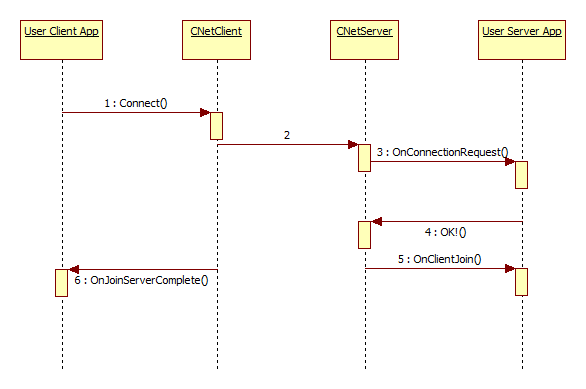
When you populate custom field parameters in Connect, its contents are passed to OnConnectionRequest.
If you populate custom parameters for the reply in OnConnectionRequest, its contents are passed to OnJoinServerComplete.
Getting a hole-punched address
First, complete the P2P communication.
Get the client's information with GetPeerInfo or GetClientInfo.
The udpAddrFromServer of the information obtained is the hole-punched address.
Reference P2P Communication
Getting the server's time
In ProudNet, you can get the time of the server for time synchronization between hosts.
| C++ Functions | C# Functions | Description |
|---|---|---|
Proud.CNetClient.GetServerTimeMs | Nettention.Proud.NetClient.GetServerTimeMs | Calculate the latency to the server to get the actual time on the server. |
Proud.CNetClient.GetP2PServerTimeMs | Nettention.Proud.NativeNetClient.GetP2PServerTimeMs | A method of obtaining latency with a server and calculating and averaging the latency of other P2P-connected clients. Get the actual time of the server more accurately. |
Breaking a callback
FrameMove will call all accumulated events and incoming RMI in unison.
ProudNet has the ability to return accumulated events and received RMI during processing within a single FrameMove call section, if the user wishes. It then allows the remaining accumulated events and incoming RMI to be processed in the next FrameMove call.
To terminate any remaining accumulated events and incoming RMI, you can call HolsterMoreCallbackUntilNextFrameMove in the routine that is processing the RMI or the routine that is processing the event.
C++
DEFRMI_TestS2C_Foo(CMyClient)
{
    ...
    /* When you call this, CNetClient.FrameMove returns immediately,
     ignoring any remaining accumulated events and RMI received. */
    HolsterMoreCallbackUntilNextFrameMove();
}

void CMyClient::OnLeaveServer(...)
{
    ...
        /* When you call this, CNetClient.FrameMove returns immediately,
         ignoring any remaining accumulated events and RMI received. */
        HolsterMoreCallbackUntilNextFrameMove();
}
C#
simpleStub.Test = (remote, rmiContext, text) => {
    ...
    /* When you call this, CNetClient.FrameMove returns immediately,
     ignoring any remaining accumulated events and RMI received. */
    netClient.HolsterMoreCallbackUntilNextFrameMove();
}

netClient.LeaveServerHandler = (errInfo) => {
    ...
    /* When you call this, CNetClient.FrameMove returns immediately,
     ignoring any remaining accumulated events and RMI received. */
    netClient.HolsterMoreCallbackUntilNextFrameMove();
}
Reference
Pending a callback
When various events and RMI received are called by Proud.CNetClient.FrameMove, there is a feature that allows you to have the desired callback happen again at a later time, which is called pending the callback. If you suspend a callback, the pending callback goes to the back of the accumulated receive queue, and the callback occurs again the next time you call CNetClient.FrameMove.
For example, if you put Callback B on hold, the callback will run as shown below.
FrameMove => Callback A => Callback B (Hold!) => return
FrameMove => Callback B(Replay what was on hold) => ... => return
If this callback feature is not understood and misused, it can be misinterpreted to mean that received RMIs or events do not arrive in the correct order, or that an infinite callback occurs. Therefore, caution is advised in its use.
To postpone the callback, you can call Proud.INetClientEvent.PostponeThisCallback or Proud.IRmiStub.PostponeThisCallback in a routine that is listening for RMI or a routine that is listening for events.
DEFRMI_TestS2C_Foo(CMyClient)
{
    ...
    /* When you call this, CNetClient.FrameMove returns immediately,
     ignoring any remaining accumulated events and RMI received. */
    PostponeThisCallback();
}

void CMyClient::OnLeaveServer(...)
{
    ...
    /* When you call this, CNetClient.FrameMove returns immediately,
     ignoring any remaining accumulated events and RMI received. */
    PostponeThisCallback();
}