
Simple to use
You can perform P2P communication with a simple code addition.
- Example of adding PIDL
See PIDL for more usage examples.
//File Name between C2C – Client
//The definition file for the Protocol.

// client-to-client RMI,
// Initial message ID = 4000
global C2C 4000
{
    P2PChat ([in] Proud::StringA txt);
}
- Server
C++
Object
Proud::CNetServer *srv
         = Proud::CNetServer::Create();
Proud::HostID groupHostID;
Creating a P2P group
// Caution! Do not use GetClientHostIDs
// on the actual server,
// manage them separately.
Proud::HostID list[100];
int listCount =
        srv->GetClientHostIDs(
             list,
             100);

groupHostID =
        srv->CreateP2PGroup(
             list,
             listCount,
             ByteArray());
Sending communications to P2P groups
g_S2CProxy.P2PChat(
         groupHostID,
         Proud::RmiContext::ReliableSend,
         L"Hello~~~!");
Destroying a P2P Group
srv->DestroyP2PGroup(groupHostID);C#
Object
Nettention.Proud.NetServer srv = new Nettention.Proud.NetServer();
Nettention.Proud.HostID groupHostID;
Creating a P2P group
// Caution! Do not use GetClientHostIDs
// on the actual server,
// manage it separately.
Nettention.Proud.HostID[] list = srv.GetClientHostIDs();

groupHostID = srv.CreateP2PGroup(
             list,
             new Nettention.Proud.ByteArray());
Sending communications to P2P groups
g_S2CProxy.P2PChat(
         groupHostID,
         Nettention.Proud.RmiContext.ReliableSend,
         "Hello~~~!");
Destroying a P2P Group
srv.DestroyP2PGroup(groupHostID);- Client
Omit them except where they are used additionally.
C++
Header
// Header File addition
#include “../C2C_Stub.h”
// CPP File addition
#include “../C2C_Stub.cpp”
What needs to be added to the Server & Client structure
client ->AttachProxy(
         &g_C2CProxy);
client ->AttachStub(
         &g_C2CStub);
Event object - the part that is used additionally
Class CClientEventSink : public INetClientEvent
{
       // This will be called
       // as many times as there are members
       // in the newly added Group.
       virtual void OnP2PMemberJoin(
           HostID memberHostID,
           HostID groupHostID,
           int memberCount,
           const ByteArray &customField) {}

       // This will be called as many times as
       // there are Members being removed.
       virtual void OnP2PMemberLeave(
           HostID memberHostID,
           HostID groupHostID,
           int memberCount) {}

       // Other omissions
}
Objects for receiving C2C communication
Class C2CStub
         : public C2C::Stub
{
DECRMI_C2C_P2PChat;
}
DEFRMI_C2C_P2PChat(C2CStub)
{
   Printf(
          “[client] %d, %s”,
          remote,
          txt);
}
C2CStub g_C2CStub;
Objects for sending C2C communications
C2C::Proxy g_C2CProxy;C#
namespace
using namespace ChatC2C;What needs to be added to the Server & Client structure
//Attach proxy,stubs to the client.
//Caution!!! This will not work without attach.
netClient.AttachProxy(c2cProxy);
netClient.AttachStub(c2cStub);
It is efficient to use Unreliable for information that you send frequently and can afford to lose, such as Move Packets.
Client with hole punched It uses Reliable UDP internally, but retransmissions occur, which can also increase traffic.
Clients with incomplete hole punching The server communicates through Relay, where Unreliable communicates with the server over UDP, and Reliable communicates over TCP.
Reduce the total amount of P2P messaging in relay communication
You can use Proud.CNetClient.GetPeerInfo to find out if the other clients you are calling RMI on are in direct P2P communication with you. If they were relay communicating, they could reduce the number of RMI calls they make to send their character's location from 8 times per second to 4 times per second.
JIT(Just-in-time) P2P connections
ProudNet is designed to perform P2P hole punching only when required.
For example, even if you actually create a connection between two peers using Proud.CNetServer.JoinP2PGroup(), the actual hole punching between the two peers is when a user initiates P2P messaging between them.
This has the effect of preventing NAT routers from being overwhelmed with port mapping entries.
If you want P2P hole punching to start as soon as a connection is established between two peers, you can select the value Always instead of JIT in Proud.CNetServer.SetDirectP2PStartCondition().
Perform routed multicast on the server to multiple clients
ProudNet leverages P2P functionality to enable effective multicast in MMO games. Server-to-client routed multicast is a feature that relays communication from the client to the server using P2P functionality, which can be used to reduce traffic generated by the server.
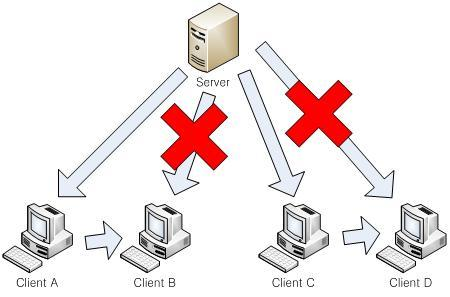
The following conditions must be met to enable server-to-client routed multicast.
It must be Unreliable Messaging.
It must be a single call for multicast. You cannot do server-to-client routed multicast if you call RMI for each destination separately to send to multiple hosts.
Members of the parameters of Proud.RmiContext Proud.RmiContext.m_unreliableS2CRoutedBroadcastMaxCount must be filled in.
If necessary, also fill in Proud.RmiContext.m_unreliableS2CRoutedBroadcastMaxPing. Default: default value
You must have previously communicated P2P or change the P2P connection condition from JIT to always.
Including a server as a member of a P2P group
P2P groups can add servers as group members, which works well when you want messages sent to the P2P group to also be sent to the server.
Make sure your RMI stub is associated with the server side as well as the client.
For example, if you have a group of RMI functions called X, X::Proxy should be associated with Proud.CNetClient.AttachProxy, and X::Stub should be associated with Proud.CNetClient.AttachStub and Proud.CNetServer.AttachStub so that the server can also receive RMI calls sent to the P2P group. After that, you need to set Proud.CStartServerParameter.m_allowServerAsP2PGroupMember to 'true' and start the server, so that the server is also allowed to be a member of the P2P group.
When creating a P2P group or adding members to an existing P2P group, if you include Proud.HostID_Server as a parameter, the server will also be a member of the P2P group.
Super Peer-focused P2P networking
One method of peer-to-peer communication in massively multiplayer online games (MO or casual) is for one member of the P2P group to be responsible for both sending and receiving messages for gameplay. This is sometimes referred to as Super Peer (or host) driven P2P networking.
In a Super Peer-centric approach to P2P networking, while playing a game, each peer does not send messages directly to all members of the P2P group. Instead, they send messages to one designated Super Peer, who then sends them directly to all other members of the P2P group.
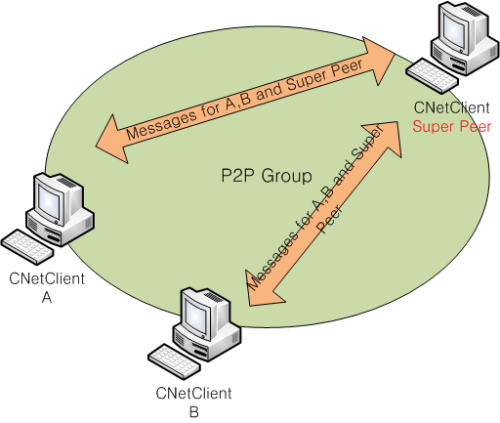
A client in a P2P group with a very good internet connection can effectively act as a super peer: traffic to the super peer client will take as much incoming traffic as the number of other clients, and as much outgoing traffic as the square of the number of other clients.
However, if none of the clients in a P2P group have good communication speeds, the quality of the game can suffer. Therefore, when implementing P2P networking focused on Super Peer, you should consider the communication quality of your Super Peer and choose it carefully.
- How to choose a Super Peer
Peer on a direct internet line, not an internet router
Peer with high transmission rates
Peer with a high execution frame rate per second due to good performance
- Execution performance and traffic considerations for Super Peer
One of the purposes of using a Super Peer is to have one of your clients perform computations that the server cannot handle. For physics engine computations and gameplay that is directly affected by the results of those computations, it makes sense to use a Super Peer to offload the processing.
ProudNet uses the frame rate to determine the execution performance of a Super Peer. To do this, we need to do the following.
Set Proud.CSuperPeerSelectionPolicy.m_frameRateWeight or use Proud.CSuperPeerSelectionPolicy.GetOrdinary() during the Super Peer selection process.
Pass the measured frame rate from your app to Proud.CNetClient via Proud.CNetClient.SetApplicationHint.
The transmission volume per second for home Internet typically does not exceed 30KB to 200KB and varies greatly.
Since Super Peer requires a significantly higher amount of transmissions per second than other peers, if it is selected as a computer under the home Internet, it is necessary to adjust the amount of communication, see throttling.