
簡單的使用方法
透過添加簡單的程式碼就可以進行P2P通訊。
- PIDL 新增範例
詳細使用範例請參考PIDL。
//File Name C2C – 這是客戶端之間
//協定的定義檔。

// client-to-client RMI,
// 第一條訊息ID = 4000
global C2C 4000
{
    P2PChat ([in] Proud::StringA txt);
}
- 伺服器
C++
對象
Proud::CNetServer *srv
         = Proud::CNetServer::Create();
Proud::HostID groupHostID;
建立P2P組
// 警告! 不要在實際伺服器上
// 使用GetClientHostIDs,
// 而是單獨管理它。
Proud::HostID list[100];
int listCount =
        srv->GetClientHostIDs(
             list,
             100);

groupHostID =
        srv->CreateP2PGroup(
             list,
             listCount,
             ByteArray());
向 P2P 組發送通信
g_S2CProxy.P2PChat(
         groupHostID,
         Proud::RmiContext::ReliableSend,
         L"Hello~~~!");
銷毀P2P組
srv->DestroyP2PGroup(groupHostID);C#
對象
Nettention.Proud.NetServer srv = new Nettention.Proud.NetServer();
Nettention.Proud.HostID groupHostID;
建立P2P組
// 警告! 不要在實際伺服器上
// 使用GetClientHostIDs,
// 而是單獨管理它。
Nettention.Proud.HostID[] list = srv.GetClientHostIDs();

groupHostID = srv.CreateP2PGroup(
             list,
             new Nettention.Proud.ByteArray());
向 P2P 組發送通信
g_S2CProxy.P2PChat(
         groupHostID,
         Nettention.Proud.RmiContext.ReliableSend,
         "Hello~~~!");
銷毀P2P組
srv.DestroyP2PGroup(groupHostID);- 客戶
除了額外使用的部件之外,將其省略。
C++
Header
// Header File 添加
#include “../C2C_Stub.h”
// CPP File 添加
#include “../C2C_Stub.cpp”
需要添加到Server & Client端結構的部分
client ->AttachProxy(
         &g_C2CProxy);
client ->AttachStub(
         &g_C2CStub);
Event 對象 - 額外使用的部分
Class CClientEventSink : public INetClientEvent
{
       // 它被連續調用
       // 與新添加的組成員的
       // 數量一樣多。
       virtual void OnP2PMemberJoin(
           HostID memberHostID,
           HostID groupHostID,
           int memberCount,
           const ByteArray &customField) {}

       // 當許多成員被刪除時,
       // 它會被不斷調用。
       virtual void OnP2PMemberLeave(
           HostID memberHostID,
           HostID groupHostID,
           int memberCount) {}

       // 其他省略
}
用於接收C2C通訊的對象
Class C2CStub
         : public C2C::Stub
{
DECRMI_C2C_P2PChat;
}
DEFRMI_C2C_P2PChat(C2CStub)
{
   Printf(
          “[client] %d, %s”,
          remote,
          txt);
}
C2CStub g_C2CStub;
用於發送C2C通訊的對象
C2C::Proxy g_C2CProxy;C#
namespace
using namespace ChatC2C;需要添加到Server & Client端結構的部分
//將 proxy 和 stub attach到 client 。
//警告!!! 如果不附加的話就不起作用。
netClient.AttachProxy(c2cProxy);
netClient.AttachStub(c2cStub);
對於頻繁發送和丟失的信息,如Move Packet,使用Unreliable更有效。
已完成打孔的客戶端 它內部使用可靠的UDP,但會發生重傳,這可能會增加流量。
未打孔的客戶端 透過伺服器進行中繼通信,此時Unreliable使用UDP與伺服器通信,Reliable使用TCP通訊。
減少 Relay 通信時的 P2P 消息總量
透過Proud.CNetClient.GetPeerInfo,您可以找出將接收RMI呼叫的另一個客戶端是否正在與您進行直接P2P通訊。 如果您使用中繼通信,有一種方法可以減少每秒傳輸角色位置 8 次的 RMI 調用次數到每秒 4 次。
JIT(Just-in-time) P2P 連接
ProudNet 被設計為僅在必要時執行點對點打洞。
例如,即使實際上使用 Proud.CNetServer.JoinP2PGroup() 在兩個對等點之間建立了連接,當使用者在兩個對等點之間發起 P2P 訊息傳遞時,也會發生實際的打洞。
這些功能具有預防NAT路由器port mapping entry過多現象的效果。
如果要在兩個對等點之間建立連線後立即執行 P2P 打洞,請在 Proud.CNetServer.SetDirectP2PStartCondition() 中選擇 Always 值而不是 JIT。
在服務器上對多個客戶端進行 routed multicast
ProudNet利用P2P功能在MMO遊戲中實現有效的組播。 server-to-client routed multicast是利用P2P功能在客戶端進行服務器通信Relay的功能,利用該功能可以減少服務器產生的流量。
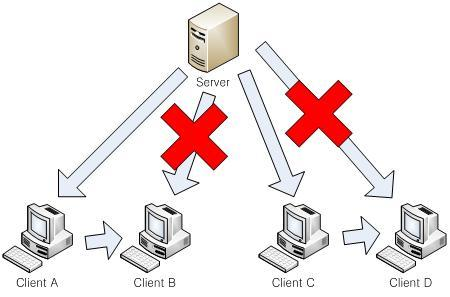
只有滿足以下條件,才能進行server-to-client routed multicast。
必須是Unreliable 消息。
爲了Multicast,必須是一次呼叫。 如果爲發送給多個主機而爲每個目標分別調用 RMI,則無法執行server-to-client routed multicast。
Proud.RmiContext的參數成員Proud.RmiContext.m_unreliableS2CRoutedBroadcastMaxCount必須填寫。
如有需要,還需填寫 Proud.RmiContext.m_unreliableS2CRoutedBroadcastMaxPing。預設:預設值
必須事先在P2P之間進行過通信或將P2P連接條件從JIT改爲always。
將伺服器包含為 P2P 群組成員
您可以將伺服器作為群組成員新增至 P2P 群組中,當您也想將 P2P 群組的訊息傳送到伺服器時,這非常有效。
RMI stub不僅要連接客戶端,還要連接服務器方面。
例如,當存在名爲X的RMI函數組時,X:Proxy通過Proud.CNetClient.AttachProxy連接,X:Stub通過Proud.CNetClient.AttachStub, Proud.CNetServer.AttachStub連接,服務器才能接收發送給P2P組的RMI呼叫。 然後,您必須將 Proud.CStartServerParameter.m_allowServerAsP2PGroupMember 設定為'true'並啟動伺服器以允許伺服器成為 P2P 群組的成員。
建立P2P群組或新增成員至現有P2P群組時,如果輸入Proud.HostID_Server作為參數,則伺服器也會成為P2P群組的成員。
以 SuperPeer 爲中心的 P2P 網絡
在小型多人線上遊戲(MO 或休閒)遊戲中,點對點之間進行溝通的方法之一是 P2P 組的一名成員負責發送和接收遊戲的所有訊息。 這種方式也稱為以Super Peer(超級對等點或主機)為中心的 P2P網絡。
在以Super Peer 為中心的 P2P 網絡方式中,在遊戲進行過程中,每個peer都不會將要發送的信息直接發送給P2P組的所有成員。 相反,它會向指定的 1 個 SuperPeer 發送消息, 並將消息直接發送給 P2P 組中的所有其他成員 。
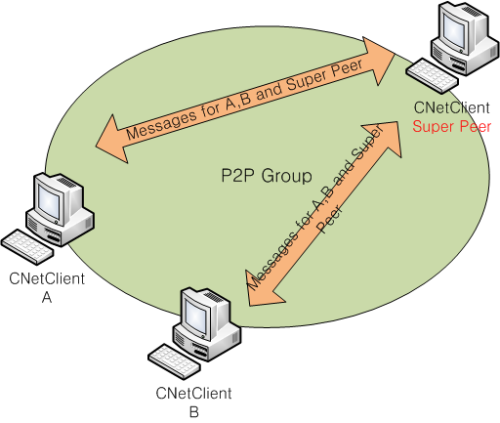
在P2P組的客戶端中,如果網路環境很好的客戶端作為超級節點是有效的。 此時,超級對等客戶端收到的流量與其他客戶端的數量一樣多,收到的流量與其他客戶端數量的平方一樣多。
然而,如果P2P組中的客戶端都沒有良好的通訊速度,則遊戲品質可能會下降。 因此,在實現以超級節點為中心的P2P組網時,必須慎重選擇超級節點的通訊品質。
- 如何選擇 Super Peer
直接連接到網絡線路而不是路由器上的peer
高傳輸速率peer
性能好、 每秒運行幀率高的peer
- Super Peer執行效能和流量考慮
使用SuperPeer的目的之一是借調服務器難以承受的運算量,並實施客戶端之一。 進行物理引擎運算並直接影響其運算結果的遊戲玩法,建議由SuperPeer代理處理。
ProudNet爲了判斷Super Peer的執行性能,使用frame rate。 為此,您需要執行以下操作:
在 SuperPeer 選定過程中設置 Proud.CSuperPeerSelectionPolicy.m_frameRateWeight 或使用 Proud.CSuperPeerSelectionPolicy.GetOrdinary() 方法。
通過 Proud.CNetClient.SetApplicationHint 將應用程序中測量的frame rate傳遞給 Proud.CNetClient 。
家庭網路每秒的傳輸量一般不超過30KB至200KB,且差異較大。
由於Super Peer要求的每秒傳輸速率比其他peer高很多,因此當選擇其作為家庭上網的電腦時,需要控制通訊音量,為此請參考發送量自動調節功能 (throttling)。