
MiniDump (오류덤프시스템) 은 ProudNet에서 제공하는 기능으로 온라인 게임 서비스를 하는 중에 게임 클라이언트 또는 게임 서버가 충돌했을 때 원인을 추적하고 신속하게 조치하기 위해 오류 정보를 개발사에서 바로 수집할 수 있습니다.
오류 정보는 *.DMP 파일로 수집 되며, 개발자는 수집된 덤프 파일을 개발 도구(예: Visual Studio 등)에서 열어 소스 파일 어느 라인에서 충돌이 발생했는지 체크할 수 있게 됩니다.
오류 덤프 시스템 구축하기 튜토리얼
오류 덤프 시스템 구축하기 튜토리얼은 게임 서버 및 클라이언트를 포함하였습니다.
(1) DbgHelp 라이브러리 설치
OS가 설치된 폴더 (C:\Windows\system32) 또는 프로그램 현재 폴더에 dbghelp.dll 을 복사해 넣습니다. dbghelp.dll 은 (ProudNet 설치경로)\ProudNet\Sample\Bin 에 있습니다.
(2) Visual Studio 컴파일 옵션 설정
MiniDump (오류덤프시스템) 을 위해서는 아래와 같이 C++ 컴파일 설정을 해주셔야 합니다.
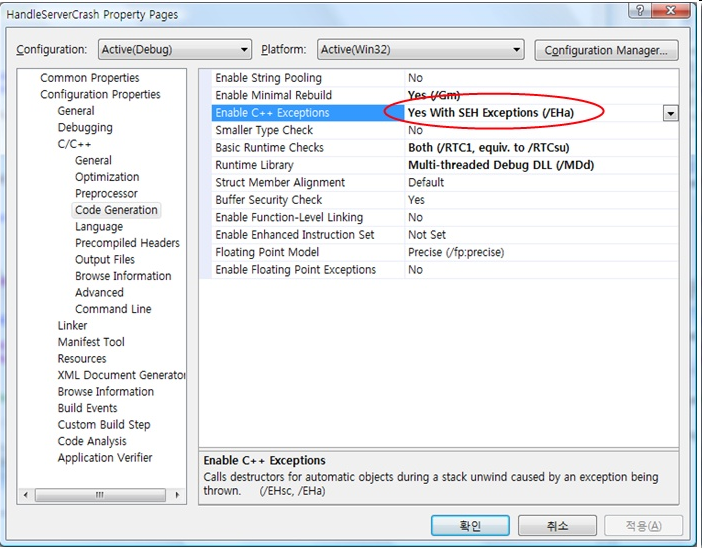
Visual Studio 2003의 경우 위와 같이 설정할 수 없으므로 'No'를 선택 후 Configuration Properties -> C/C++ -> Command Line -> Additional Options에서 /EHa 를 추가해야 합니다.
(3) 덤프 서버 제작 예제
덤프 클라이언트에서 보내온 오류 정보 덤프 파일을 수집하는 역할을 수행합니다.
C++
#include "../../../include/ProudNetServer.h"
#include "../../../include/DumpServer.h"
#include "MyDumpServer.h"
class CMyDumpServer : public IDumpServerDelegate
{
    ...
    virtual void OnStartServer(CStartServerParameter &refParam) override;
    String GetDumpFilePath(HostID clientEnid, const Proud::AddrPort& clientAddr, CPnTime dumpTime) override;
    void Run();
}
void main(int argc, char* argv[])
{
    CMyDumpServer srv;
    srv.Run();
}
(4) 덤프 클라이언트 제작 예제
덤프 클라이언트는 오류 정보를 담은 덤프 파일을 덤프 서버에 전송하는 역할을 합니다.
프로세스에서 충돌이 발생하면 자동으로 임시 *.DMP 덤프파일이 만들어지고, 다시 프로세스가 실행되면서 명령인자(Command Argument)에 오류레벨정보가 첨부됩니다.
이렇게 명령인자로 들어온 오류레벨정보는 심각성에 따라 분기 처리해야 하며, MiniDumpAction_AlarmCrash의 경우 심각한 오류에 해당하므로 반드시 덤프 파일을 덤프 서버에 전송해주는 코드를 작성해야 합니다.
(5) 게임 서버를 위한 덤프 클라이언트 제작하기
게임 서버는 일반적으로 사용자 UI를 제공하지 않기 때문에 오류 보고 대화 상자를 띄우지 않고 *.DMP 덤프파일을 곧바로 덤프 서버에 전송하도록 코드를 작성해야 합니다.
(6) 게임 클라이언트를 위한 덤프 클라이언트 제작하기
게임 클라이언트는 일반적으로 사용자 UI가 제공되므로 오류 보고를 띄워서 생성된 *.DMP 덤프파일을 덤프 서버에 전송할 것인지 아니면 생략할 것인지 여부를 게임 사용자에게 확인 후 진행하도록 코드를 작성해야 합니다.
주의
모든 모바일 환경에서의 덤프 클라이언트는 지원하지 않습니다.
Proud.CMiniDumpParameter 를 사용하여 반드시 덤프 시스템을 초기화해야 합니다.
유니코드 프로그래밍 모델의 경우 main 함수의 와이드 문자 버전을 정의할 수 있는데, wmain 함수에 대한 argv 및 envp 매개 변수는 wchar_t* 형식을 사용해야 합니다.
MiniDumpAction_AlarmCrash, MiniDumpAction_DoNothing 의 경우 분기처리 이후 반드시 return을 호출하여 무한 루프에 빠질 수 있으므로 프로그램을 종료해야 합니다.
C++
#include "stdafx.h"
#include <atlpath.h>
#include "../../include/MiniDumper.h"
#include "../../include/DumpCommon.h"

using namespace Proud;

const int _MAX_PATH2 = 8192;
#define _COUNTOF(array) (sizeof(array)/sizeof(array[0]))

void GetDumpFilePath(LPWSTR output)
{
    WCHAR path[_MAX_PATH2];
    WCHAR drive[_MAX_PATH2];
    WCHAR dir[_MAX_PATH2];
    WCHAR fname[_MAX_PATH2];
    WCHAR ext[_MAX_PATH2];
    WCHAR module_file_name[_MAX_PATH2];

    GetModuleFileNameW(NULL, module_file_name, _COUNTOF(module_file_name));
    _tsplitpath_s(module_file_name, drive, _MAX_PATH2, dir, _MAX_PATH2, fname, _MAX_PATH2, ext, _MAX_PATH2);
    _tmakepath_s(path, _MAX_PATH2, drive, dir, L"", L"");
    wsprintf(output, L"%s%s.DMP", path, fname);
};

void AccessViolation()
{
    int* a = 0;
    *a = 1;
}

// void wmain(int argc, wchar_t* argv[])
int main(int argc, char* argv[])
{
    int nRetCode = 0;
    int *data = 0;
    int menu = 0;

    WCHAR dumpFileName[_MAX_PATH2] = { 0, };
    GetDumpFilePath(dumpFileName);

    CMiniDumpParameter parameter;
    parameter.m_dumpFileName = dumpFileName;
    parameter.m_miniDumpType = SmallMiniDumpType;

    switch (CMiniDumper::Instance().Startup(parameter))
    {
    case MiniDumpAction_AlarmCrash:
        // 오류 발생으로 새로운 프로세스에서 덤프 파일을 생성한 후, 이 값이 return이 됩니다.
        // 생성된 덤프 파일을 메일로 보내거나 에러 창을 보이는 등 유저가 덤프 파일 생성 후, 처리해야할 작업을 처리해주시면 됩니다.

        // A dump file is created at a new process due to error occurrence and then this value will be returned.
        // After a user create a dump file, do works that need to be done such as sending a created dump file by email or showing an error window.

        // 因出现错误,在新的process中生成转储文件后该值将被返还。
        // 将生成的转储文件以邮件的形式发送,或可以看到 Error对话框的用户生成转存文件后,处理应处理的事即可

        // エラー発生により新しいプロセスからダンプファイルを生成した後、この値がreturnされます。
        // 生成されたダンプファイルをメールで送ったり、エラーメッセージが提示されるなどユーザーがダンプファイル生成後、処理すべきの作業をしてください。
        ...
        return nRetCode;

    case MiniDumpAction_DoNothing:
        // 유저 호출로 새로운 프로세스에서 덤프 파일을 생성한 후, 이 값이 반환됩니다.
        // 이 경우에는 아무것도 하지 말아야합니다.

        // After creating a dump file at a new process by calling a user, this value will be returned.
        // In this case, you should not do anything.

        // 因用户呼叫,在新的process中生成转储文件后,该值将被返还。
        // 在这种情况,不要做任何事情。.

        // ユーザー呼び出しにより新しいプロセスからダンプファイルを生成した後、この値が返還されます。
        // この場合何もしないでください。
        ...
        return nRetCode;

    default:
        // MiniDumpAction_None
        // 일반적으로 앱 실행 시, 이 값이 반환됩니다.
        // 여기서는 일반적으로 처리해야할 일을 처리해주시면 됩니다.

        // When executing apps, this value will be returned.
        // In this case, do works that generally need to be done.

        // 一般运行App时,该值将被返还。
        //在这里处理一般应处理的事情即可。

        // 一般的にアプリ実行後、この値が返還されます。
        // ここでは一般的に処理すべきの事を処理してください。
        ...
        break;
    }

    while (1)
    {
        puts("MENU: 1. Access Violation('a')");
        printf("> ");

        menu = getchar();

        switch (menu)
        {
        case 'a':
            AccessViolation();
            break;
        default:
            break;
        }
    }

    return 0;
}
오류 덤프 시스템 활용
- C 런타임 오류를 오류 덤프 시스템에서 가로채기
STL에서 out-of-the-range 오류나 pure virtual function이 런타임에서 호출되는 오류는 기본적으로 오류 덤프 시스템에서 감지하지 못합니다.
오류 덤프 시스템은 Structured Exception 만을 처리하는데, 상기 오류는 C runtime library에서 소화되기 때문입니다. 따라서 이들 오류가 C runtime library에서 소화되기 전에 Structured Exception으로 우회시켜야 오류 덤프를 남길 수 있습니다.
아래는 오류 덤프를 남기는 방법입니다.
C++
// Pure virtual function called" 오류를 오류 덤프 시스템에서 받도록 우회시키기.
void myPurecallHandler(void)
{
    printf("In _purecall_handler.");

    int* a = 0;
    *a = 1; // 크래시 유발. 오류 덤프 시스템으로 우회시키기.
}

int main()
{
    /* pure virtual function called 에러 핸들러를 사용자 정의 함수로 우회시킨다.
    프로그램 처음 시작시에만 넣어주면 된다.*/
    _set_purecall_handler(myPurecallHandler);
    ...
}
C++
// STL의 "out of the range 오류"를 오류 덤프 시스템에서 받도록 우회시키기.
// 주의!! _CrtSetReportHook은 ATLTRACE를 사용하면 설정한 함수에 들어 올 수 있으므로, retportType == _CRT_WARN은 무시해야 합니다.

int YourReportHook(int reportType, char *message, int *returnValue)
{
    //_CRT_WARN or 0는 무시합니다.
    if (reprotType != _CRT_WARN)
    {
        int* a = 0;
        *a = 1; // 크래시 유발. 오류 덤프 시스템으로 우회시키기.
    }

    return 1;
}

int main()
{
    /* C runtime library error의 핸들러를 사용자 정의 함수로 우회시킨다.
    프로그램 처음 시작시에만 넣어주면 된다.*/
    _CrtSetReportHook(YourReportHook);

    std::vector<int> a;
    a[1] = 0; // 오류 핸들러가 우회됐는지 시험

}
- 중단없는 오류 덤프 시스템(Exception Logger)
ProudNet에서는 프로그램에서 오류가 발생할 경우 프로그램을 종료하지 않고 오류 위치를 계속해서 남기는 기능을 제공합니다. 이를 중단없는 오류 덤프 시스템(Exception Logger)이라고 부릅니다.
일반적인 게임 서버는 충돌이 발생되면 즉시 상황을 덤프로 남기고 프로그램을 재시작 하지만 부득이한 경우, 프로그램을 재시작하지 않은 채로 오류가 나는 상황을 유지하며 억지로 게임 서버의 실행 유지를 강행해야 하는 경우도 있습니다.
그러나 이미 메모리 상태가 망가진 서버 프로그램이 계속 실행되면 위험하니 주의해야 합니다.
중단없는 오류 덤프 시스템 제작 전 체크사항
DbgHelp 라이브러리(dbghelp.dll)를 설치해야 합니다.
Visual Studio 의 C++ Exception 컴파일 옵션을 설정해야 합니다.
Include : DumpCommon.h, MiniDumper.h
Link : ProudNetCommon.lib
제작 예제
프로그램의 시작점(Main Entry Point)에서 CExceptionLogger::Instance().Init() 함수를 호출하여, CExceptionLogger 인스턴스를 반드시 초기화합니다. IExceptionLoggerDelegate 추상클래스를 상속하고 GetDumpDirectory() 멤버를 오버라이딩하여 덤프파일 경로를 정의해 줍니다. 공백("")을 리턴할 경우 현재 폴더에 덤프파일이 저장됩니다.
Windows XP와 Windows 2003 Server 또는 그 이후의 버전의 운영체제에서 동작합니다. CExceptionLogger 클래스와 ATLTRACE() 또는 OutputDebugString() 를 혼용하여 사용한다면 로그 기록의 부하로 프로그램 성능이 저하될 수 있습니다.
본 예제 소스 파일은 <설치 폴더>\Sample\SimpleExceptionLogger 에 있습니다.
SimpleExceptionLogger 예제는 1.7.33863버전 이후로 지원되지 않습니다.
C++
#include "stdafx.h"
#include <atlpath.h>
#include "../../include/DumpCommon.h"
#include "../../include/MiniDumper.h"

using namespace Proud;

class CIExceptionLoggerDelegate : public IExceptionLoggerDelegate
{
    public:
    virtual String GetDumpDirectory()
    {
        return L"";
    }
};

CIExceptionLoggerDelegate g_loggerInfo;

void AccessViolation()
{
    try
    {
        int* a = 0;

        // 이 루틴은 크래쉬를 의도적으로 발생시킵니다.
        // This routine incurs crash on purpose.
        // 该例程将会故意造成崩溃。
        // このルーティンはクラッシュを意図的に発生させます
        *a = 1;
    }
    catch (...) // catch(...) syntax itself is the usable C++ keyword!
    {
        // 위 try 구문에 의해 크래쉬가 발생할 경우
        // 프로그램이 종료되지 않고 여기로 실행 지점이 오게 됩니다.
        // 한편 exception logger에 의해 오류 로그가 파일로 남게 됩니다.
        // When crash occurs by the above try syntax,
        // the execution point moves to here without terminating the program.
        // At the same time, exception logger leaves an error log file.
    }
}

void main(int argc, char* argv[])
{
    int menu = 0;
    CExceptionLogger::Instance().Init(&g_loggerInfo);

    while (1)
    {
        puts("MENU: 1. Access Violation('a')");
        printf("> ");

        menu = getchar();

        switch (menu)
        {
        case 'a':
            AccessViolation();
            break;
        default:
            break;
        }
    }
}
- 프로세스의 현재 상태를 덤프 파일로 남기기
오류 상황이 아니더라도 프로세스의 현재 상태를 덤프 파일로 남기는 기능이 있는데, 이는 저장된 덤프 파일은 해당 덤프가 된 프로그램을 빌드 할 때 같이 생성된 디버그 정보 파일(.pdb)과 함께 열면 프로세스의 실행 중이던 상황을 소스 수준에서 볼 수 있습니다.
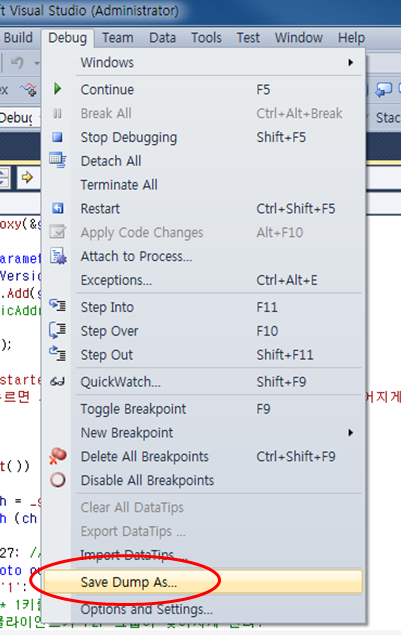
이 기능으로 디버깅이 어려운 환경에서도 프로세스의 현재 상태를 덤프로 남길 수 있습니다. Proud.CMiniDumper.WriteDumpFromHere 를 호출하면 호출한 시점에서의 프로세스 내 모든 스레드의 호출 스택을 덤프 파일로 저장합니다.