# 事件處理

## 處理事件處理程序

ProudNet 的事件處理是基於委託模式。

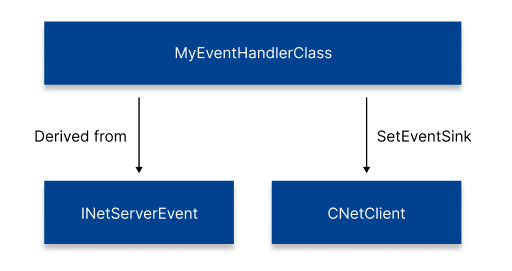
客戶端繼承並實作<mark style="color:orange;">Proud.INetClientEvent</mark>類，伺服器繼承並實作<mark style="color:orange;">Proud.INetServerEvent</mark>類別。\
建立已實作類別的實例後，必須透過伺服器上的 <mark style="color:orange;">Proud.CNetServer.SetEventSink</mark> 和用戶端上的 <mark style="color:orange;">Proud.CNetClient.SetEventSink</mark> 連線它。

{% tabs %}
{% tab title="C++" %}

```cpp
class MyEvent:public INetClientEvent
{
    virtual void OnJoinServerComplete(...) override 
    { 
        // my event handler
        ...
    }
}
 
MyEvent m_myEvent;
myNetServer->SetEventSink(&m_myEvent); 
```

{% endtab %}
{% endtabs %}

{% hint style="info" %}
如果您使用支援**C++11**的編譯器，

您可以使用 lambda 表達式而不是繼承上面的類別來進行更簡潔的程式設計。
{% endhint %}

{% tabs %}
{% tab title="C++" %}

```cpp
myNetServer->OnJoinServerComplete = [...](...) 
    {
        // my event handler
        ...
    };
```

{% endtab %}

{% tab title="C#" %}

```csharp
myNetServer.OnJoinServerComplete = () =>
    {
        // my event handler
        ...
    };
```

{% endtab %}
{% endtabs %}

有關何時透過上述過程接收事件回呼的信息，請參閱[**了解主循環**](/proudnet.cn/proudnet-note/notes/main_loop.md)。

<figure><img src="/files/xQwlZ3ZvOKQq430y1yK5" alt=""><figcaption><p>關聯客戶端上的事件處理程序</p></figcaption></figure>

伺服器中可能發生的典型事件包括“收到客戶端的連線”，客戶端中發生的典型事件包括“與伺服器建立連線”和“P2P成員參與”。

{% hint style="danger" %}
**對事件進行日誌處理是絕對必要的。**

在技​​術支援過程中，大多數問題的出現​​都是因為不處理Log而很難找到問題的原因。 特別是，請務必記錄包含 <mark style="color:orange;">errorInfo</mark> 作為參數的函數以及以下事件。

* <mark style="color:orange;">OnError</mark>: 由於 ProudNet 內發生錯誤或使用過程中出現問題而回呼訊息。
* <mark style="color:orange;">OnWarning</mark>: 回調不嚴重但有潛在問題的資訊。
* <mark style="color:orange;">OnInformation</mark>: 回調內部情況、追蹤等資訊。
* <mark style="color:orange;">OnException</mark>: 回調內部Exception錯誤訊息。<br>

使用參數<mark style="color:orange;">errorInfo</mark>的<mark style="color:orange;">errorInfo->ToString();</mark>可輕鬆獲得有關問題的信息。
{% endhint %}


---

# Agent Instructions: Querying This Documentation

If you need additional information that is not directly available in this page, you can query the documentation dynamically by asking a question.

Perform an HTTP GET request on the current page URL with the `ask` query parameter:

```
GET https://docs.proudnet.com/proudnet.cn/proudnet/using_pn/eventhandling.md?ask=<question>
```

The question should be specific, self-contained, and written in natural language.
The response will contain a direct answer to the question and relevant excerpts and sources from the documentation.

Use this mechanism when the answer is not explicitly present in the current page, you need clarification or additional context, or you want to retrieve related documentation sections.