
📚 Burst Time
Burst time is broadly divided into CPU burst time and Device burst time.
- CPU burst time
The amount of time that only the CPU is computing to execute a particular routine. The CPU core occupancy of a thread during CPU burst time can be seen as 100.
- Device burst time
The amount of time the CPU waits for other processing to complete while executing a particular routine. The CPU core occupancy of a thread during Device burst time is zero. Typical cases where the CPU is waiting for other processing to complete are reading/writing files, running DB queries, and waiting for service responses from other hosts.
📚 C++ Singleton
In the C++ language, there is a difference between a singleton and a global variable. Global variables are not destroyed immediately before termination when WinMain() or main() is executed; they are destroyed in the calling function. The order of destruction of global variables is only guaranteed in the compilation output of a single C++ file; the order of destruction between compilation outputs of different C++ files is not guaranteed.
However, a C++ singleton is called just before WinMain() or main() returns. Moreover, the moment a singleton is accessed for the first time, the instance's constructor is called, and the order in which it is destroyed is the reverse order in which the constructor was called. This ensures safer creation/destruction rules than global variables.
Here is an example implementation of a C++ singleton.
➡️ example implementation of a C++ singleton
class A
{
    A(){}
public:
    static A& Instance()
    {
        static A inst;
        return inst;
    }
    void Goo() {}
};


void Foo()
{
    A::Instance().Goo();
}
The risk with the above implementation is that if the singleton is accessed by multiple threads at the same time in a short period of time, the constructor may be called more than once.
We recommend using the class Proud.CSingleton, which solves these problems but does not have a critical section load for singleton access.
📚 DB Constraints
This refers to preventing a field from entering if it does not meet a particular condition.
Primary Key Unique Index, etc. ( >, <, =, != ) Constraint is implemented as Unique Index, Trigger, etc.
📚 Fast Heap
ProudNet's Fast heap is slightly slower than the Lookaside allocator, but much faster than the rate at which memory is allocated/released in the OS environment. And unlike the Lookaside allocator, it can allocate/release blocks of memory of different sizes.
The implementation class of FastHeap of ProudNet is Proud.CFastHeap. Proud.CFastHeap like the Lookaside allocator, can only remove the Proud.CFastHeap object after all memory blocks have been destroyed.
Here is how to use Fast heap.
First, create a fast heap object with the Proud.CFastHeap.New method. You can also create it as a global object.
Allocate a block of memory with the Proud.CFastHeap.Alloc method.
Release is done with Proud.CFastHeap.Free. Memory blocks can be reallocated with CFastHeap.Realloc.
Destroy the Proud.CFastHeap object after releasing all memory blocks.
📚 P2P group
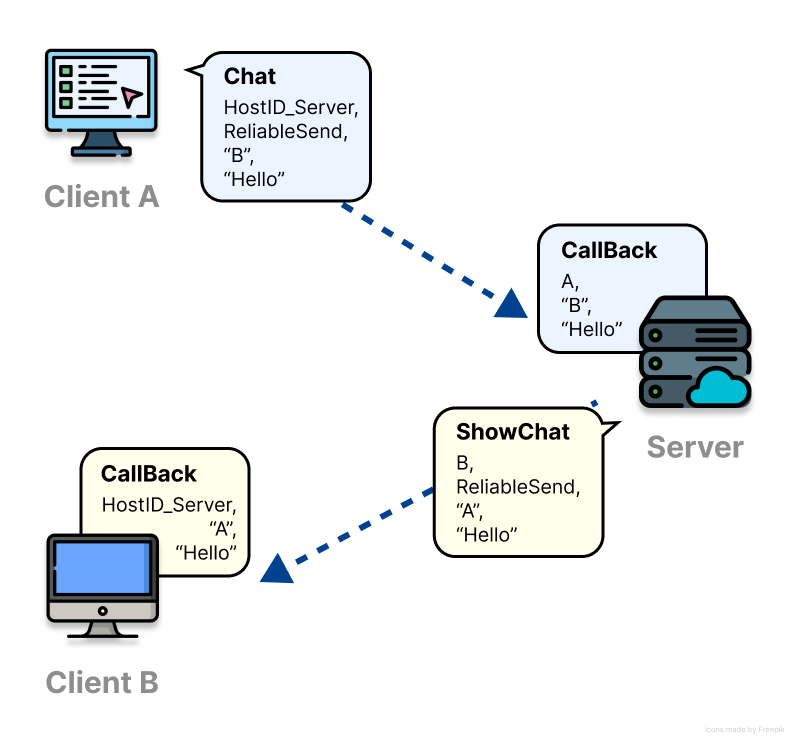
If two clients A and B want to peer-to-peer communicate with each other, they must be members of at least one peer-to-peer group. Multiple people can chat with each other in a single chat window, and multiple chats can be created by creating multiple chat windows. However, you can't chat in a chat room you're not in.
ProudNet is like an internet messenger, where each chat window corresponds to a peer-to-peer group.
The difference is that only the server has permission to create or join other chat rooms. P2P group identifiers are also of type Proud.HostID.
📚 PIDL
PIDL is a homegrown compiler for RMI.
When you define and set a Protocol for a specific file, it will automatically create the file with the object. Since the objects created are used by both server and client, it is convenient to create and manage a Common Project.
📚 Reliable Messaging
Reliable messaging (or reliable send) means that the content and order of messages sent by the sender is always received by the receiver in the same order. For example, if you send messages A,B,C,D,E, the receiver will receive them in the order A,B,C,D,E without any data loss.
It has the advantage of reliability, but can sometimes be slower to receive than Unreliable messaging.
📚 RMI
RMI(Remote Method Invocation) refers to calling a function on a different network or in a different process, and it serves to simplify the programming tasks that make life difficult for developers (defining message structures, writing sending and receiving functions, and sending and receiving routines) in the form of function calls by having a machine do the coding work instead of a human.
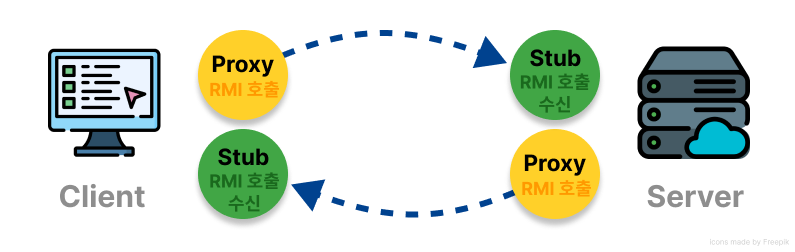
When you send a message, the side that calls the RMI function is called the Proxy, and the side that receives the call is called the Stub.
- When RMI is not used
// Message header ID definitions
#define Message_Knight_Move_ID 12
#define Message_Knight_Attack_ID 13

// Message format definitions
struct Message
{
    int m_msgID;
};
struct Message_Knight_Move:public Message
{
    int m_id;
    float m_x,m_y,m_z;
};
struct Message_Knight_Attack:public Message
{
    int m_id;
    int m_target;
    int m_damage;
};

// A function which send a formatted message
void Knight_Move(int id,float x,float y,float z)
{
    Message_Knight_Move msg;
    msg.m_msgID=Message_Knight_Move_ID;

    msg.m_id=id;
    msg.m_x=x;
    msg.m_y=y;
    msg.m_z=z;

    Send(msg);
}

// A function which send a formatted message
void Knight_Attack(int id,int target,int damage)
{
    Message_Knight_Attack msg;
    msg.m_msgID=Message_Knight_Attack_ID;

    msg.m_id=id;
    msg.m_target=target;
    msg.m_damage=damage;

    Send(msg);
}

// Identified a received message
// and call an appropriate function for message handling
void DoReceivedMessage(Message* msg)
{
    switch(msg->m_msgID)
    {
    case Message_Knight_Move_ID:
    {
        Message_Knight_Move* msg2=
            (Message_Knight_Move*)msg;

        Do_Knight_Move(
            msg2->m_id,
            msg2->m_x,
            msg2->m_y,
            msg2->m_z);
    }
    break;
    // ... cases for other message types
    case Message_Knight_Attack_ID:
    {
        Message_Knight_Attack* msg2=
            (Message_Knight_Attack*)msg;

        Do_Knight_Attack(
            msg2->m_id,
            msg2->m_target,
            msg2->m_damage);
    }
    break;
    // ... cases for other message types
    }
}c
However, if you use RMI, you can organize it into a short code as shown below.
Knight_Move([in] int id,[in] float x,[in] float y,[in] float z);
Knight_Attack([in] int id,[in] int target,[in] int damage);
The above format is an IDL(Interface Description Language) type language, which when compiled produces C++ or C# source. The generated source file consists of message structure declarations, send functions, receive processing functions, and so on; the PIDL compiler automatically generates the network processing routines without the developer having to create them.
Of the files created, the module that turns function calls into messages and sends them to the network is called a proxy, and the module that analyzes the messages received over the network and calls user functions is called a stub.
When Host A calls an RMI function X, it actually calls X's proxy, which turns it into a network message and sends it to Host B. Host B receives the message and sends it to a stub, which analyzes it and calls the function X you wrote.
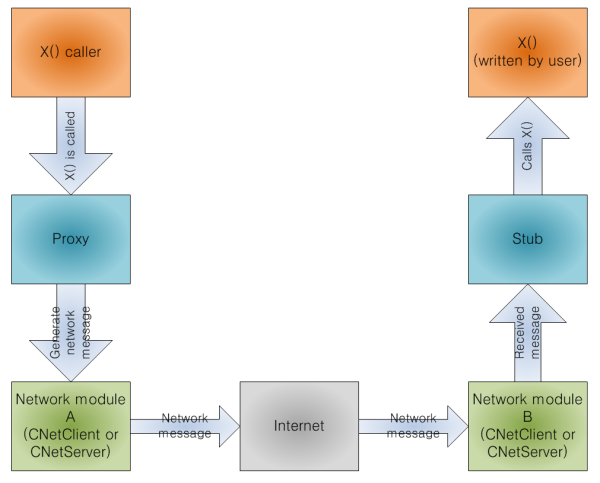
It looks a lot like calling a function on Host A from Host B, hence the name Remote Method Invocation.
📚 Stored Procedure
A Stored Procedure is a program function written in SQL syntax that can be put into the DBMS itself. When accessing a database, the query syntax string is created and thrown by the application, but if possible, it is more efficient for performance and reliability (e.g., database locking policies) to create and store the query syntax routine as a Stored Procedure, and the application calls the Stored Procedure directly.
📚 Unreliable Messaging
Unreliable messaging (or unreliable send) means that the content and order of messages sent by the sender may be received differently depending on the length and condition of the communication line.
For example, if you send messages A,B,C,D,E, the recipient may receive A,B,C,D,E, but they may receive the same message twice (A,B,B,C,C,D,E), the message may be lost in the middle (A,B,D), or the messages may arrive in a different order (A,C,B,E,D).
However, the data inside the message is not broken. Unreliable messaging has this drawback, but it is delivered faster than Reliable messaging.
📚 UUID or GUID
A unique or global universal identifier (UUID or GUID) is a 16-byte block of data, which means that the GUID you generate is probabilistically unique in the world.
The ProudNet DB assigns a UUID to each Gamer, Hero, and WorldObject. Although UUIDs are 16 bytes, which can be considered large, they are useful in a few important cases because they have the advantage of being the only duplicate UUID on the planet. The main ones are server closures, gamer account moves, and gamer ID changes.
Reference Globally unique identifier
📚 Race Condition
In engineering, a race condition is a state in which two or more inputs or manipulations occur simultaneously. In such a state, there is a risk that the normal outcome will not occur, which is known as race risk.
In computing, a race condition is when multiple processes attempt to access a shared resource at the same time, and their simultaneous access can result in inconsistent data. To avoid this, process cooperation techniques are needed.
Reference
📚 Data quantization
When sending large, floating-point values to and from the network, there are situations where tricks are possible to reduce the amount of packets. For example, if the value of character position x is only determined between 100 and 200, and the precision to two decimal places is negligible, this value can be converted to and from a value of 100 * 100 = 10000 or less, saving a double (8 bytes) to a word (2 bytes).
This trick is called quantization.
This class provides quantization and the inverse of quantization.
Proud::CQuantizer q(-10000,10000,65535); // Ability to quantize values between -10000 and 10000 to a precision of 65535 equivalents
double a = 3423.38274f;
int b = q.Quantize(a);      // Quantization
double c= q.Dequantize(b);  // Restoring real values from quantized values
📚 Listening Port
It consists of a host address and a port, and the server must have a listening port in order to receive connections from clients.
A host address is an address on the Internet, organized in the form of 111.222.111.222 or mycomputer.mydomain.com. A port is a value between 1,000 and 65,500. This can be any number, as long as no more than two programs are using the same listening port.
📚 Marshaling
Converting an RMI call into a message or extracting the values for calling RMI from a message is called marshaling. ProudNet provides marshaling for basic types like int and float.
📚 Multicast
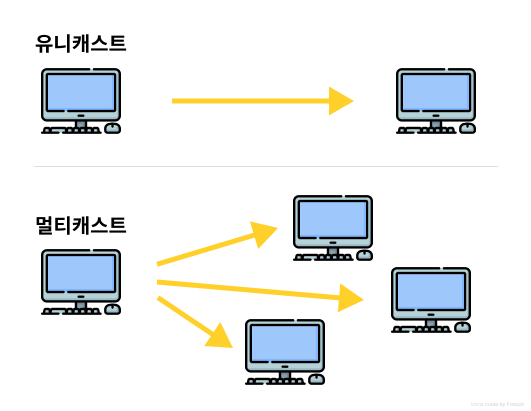
Delivering a single message to many hosts at once is called multicast, delivering a message to only one host is called unicast.
📚 Thread Pool
Creating and removing a single thread is a lot of processing, so if you have a lot of threads running, it can overload the operating system.
Therefore, we need to keep as few threads as possible and minimize the process of removing and creating threads, which can be done by having a single set of a certain number of threads that are only taken when needed and returned to the set when not needed. This process is called a thread pool.
In other words, a thread pool refers to a set of threads in which several threads are prepared in advance.
- Example
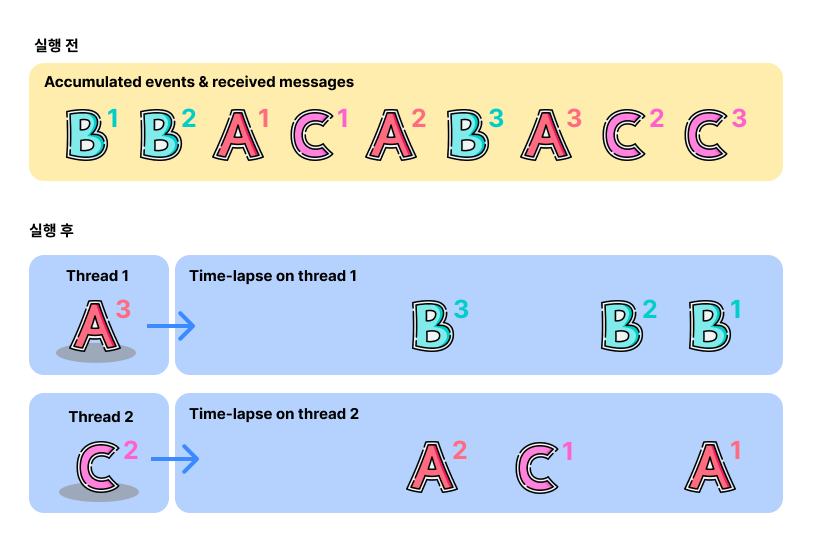
Clients A, B, and C are admitted to the server and are waiting in a queue within Proud.CNetServer due to RMI or an event, respectively.
A1,A2,A3 -> Events or RMI for Client A B1,B2,B3 -> There are a total of two threads in the event or RMI thread pool for Client B. At that point, the rule will execute as follows.
A1,A2,A3 will not run at the same time.
B1,B2,B3 and C1,C2,C3 are also not executed at the same time.
One of A1,A2,A3 and one of B1,B2,B3 and one of C1,C2,C3 can be executed at the same time.
Since there are only two threads in the thread pool, two of A, B, and C are selected and called, but the thread whose callback routine completes first performs the RMI or event callback for the unselected client.
📚 Dead reckoning
ProudNet provides tools for dead reckoning for smooth position representation of game characters.
Dead reckoning works roughly like this.
Host A sends the position and velocity of the moving character to Host B. The transmission frequency is between 2 and 10 times per second.
It is recommended that the transfer interval be dynamic. Shortening the transfer period only when the character has a large acceleration will result in more accurate movement synchronization. Large accelerations are when the character's speed changes rapidly, or when the direction of movement changes rapidly as the character hits another object. (See the table below.)
Host B obtains the time it takes for a message to arrive from Host A (latency) by pinging it.
When Host B receives the character's position and velocity information, use the following formula to predict the actual position of the character on Host A. P: Predicted location, V: Received speed, T: Latency, P0: Received location P = (V * T) + P0
Up to this point, the character's position is predictable, but when we render the calculated position value, the character's position jumps around. To solve this problem, we use Proud.CPositionFollower.
Proud.CPositionFollower is responsible for moving a follower to reach the location of a moving target within a time limit. It is specifically designed to track the location of a moving target in a straight line, which reduces the bouncing of character positions from other hosts.
Let's describe the remaining steps to implement dead reckoning.
Enter the predicted position and velocity values from Host B into the Proud.CPositionFollower object. Enter them as the target's position and velocity.
To render the position of the character on Host A, Host B gets the position of the follower of the Proud.CPositionFollower object.
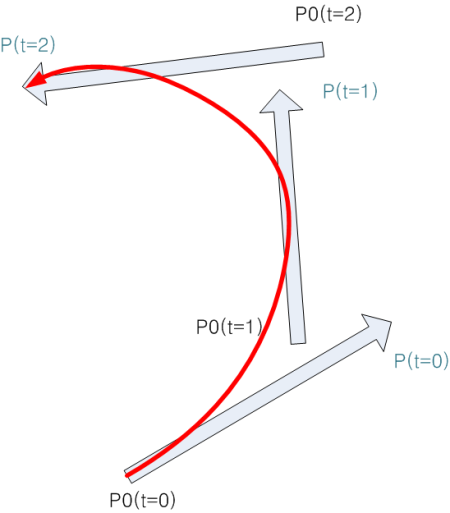
- Dead reckoning example
P(t=0,1,2) is the predicted point and the red line is the character position corrected by Proud.CPositionFollower. As a general rule of thumb, you'll want to set the same timeout between sending the character's location from Host A and the time for the tracker to reach the target's location in Proud.CPositionFollower, and the frequency of sending the character's location will vary from situation to situation.
Recommended examples
| Situation | Types of data to send | Average sending frequency | Rapidly increasing acceleration example |
|---|---|---|---|
Player character in a massively multiplayer role-playing game (MMORPG) | Position (xyz), velocity (xyz), facing direction (z) | 0.3 | Character movement direction, stance, dots, and buffs |
Airplane or vehicle | Position (xyz), velocity (xyz), acceleration (xyz), facing direction (xyz) | 0.3 | Obstacle Collisions, Sharp Turns |
Player character in a first-person shooter (FPS) game | Location (xyz), facing direction (xyz) | 0.03 | Immediately after the character changes direction of movement, the sniper rifle is fired. |
If you have short sending intervals, we recommend that you also enable Throttling to avoid the risk of sending too much.
- Spline based follower
Proud.CPositionFollower provides a follower that not only follows the target in a straight line, but also in a curve. This is a spline based follower in the form of a cubic function. This provides a smoother trajectory than a straight line follower. However, it doesn't always look as smooth, so it's best to test it out in gameplay before choosing.
To get a spline based follower, use the methods below.
Proud.CPositionFollower.GetSplineFollowerPosition
Proud.CPositionFollower.GetSplineFollowerVelocity
Corrections for angles are handled using the methods below.
Proud.CPositionFollower: Role of compensation for location
Proud.CAngleFollower: Role of compensation for angles
📚 Hole Punching
As a router also has the characteristics of a router, it means that for the purpose of peer-to-peer communication to create a routing table, packets are exchanged with the other party in advance to create a routing table on each router. The exact name is STUN (Simple Traversal of User Datagram Protocol Through Network Address Translators).
Here's how the hole punching works
Full Cone NAT
Restricted Cone
Port Restricted Cone
Symmetric Cone