
Communicating with a separate UDP socket without ProudNet
Although it is not recommended, it provides an opportunity to use only ProudNet's hole punching function while mixing 3rd party network engines.
This allows ProudNet to obtain completed hole punching information from client/server or P2P and communicate it on a UDP socket prepared separately from ProudNet.
Since the hole punching information obtained from ProudNet is the router's mapping of the Client's UDP socket, this UDP socket must be turned off. To do this, call Proud.CNetClient.Disconnect or destroy the Client object. The Client's UDP socket address is then reused by a 3rd party.
If you create duplicate UDP sockets without this process, both ProudNet and 3rd party UDP sockets will behave abnormally.
The main steps are outlined below.
First, we use Proud.CNetClient.GetDirectP2PInfo to get the hole-punched information.
Release the UDP socket occupied by ProudNet. Proud.CNetClient.InvalidateUdpSocket closes the UDP socket that the client has, leaving the router's hole-punching state intact. The value returned by Proud.CNetClient.InvalidateUdpSocket can be utilized for peer-to-peer communication in a separate module.
After calling Proud.CNetClient.InvalidateUdpSocket, write Proud.CNetClient.RestoreUdpSocket to create a new UDP socket to resume UDP communication between the server and the peer.
Even if some routers are hole-punched, the hole-punching mapping may randomly change or evaporate after tens of seconds to several minutes. ProudNet solves this problem itself with its own relay fallback function. However, when using a 3rd party UDP socket, this problem must be resolved directly by the developer or 3rd party engine, otherwise P2P communication may fail.
| C++ function | C# function | Description |
|---|---|---|
Proud.CNetClient.GetDirectP2PInfo | Nettention.Proud.NetClient.GetDirectP2PInfo | Get hole-punched information to communicate with other peers. |
Proud.CNetClient.InvalidateUdpSocket | Nettention.Proud.NativeNetClient.InvalidateUdpSocket | After terminating the internal UDP socket, P2P communication with the server is forcibly switched to the bypass state. |
Proud.CNetClient.RestoreUdpSocket | Nettention.Proud.NativeNetClient.RestoreUdpSocket | Recreate the removed UDP socket and resume punching UDP holes with the other peer. |
Proud.CNetClient.Disconnect | Nettention.Proud.NetClient.Disconnect | Terminate the connection with the server and leave all P2P groups. |
The above method is not normal usage. Therefore, ProudNet is not responsible for any problems caused by use_alternative_p2p.
Using ProudNet in a DLL project
If you want to use ProudNet as a static library but in a DLL project, you must call Proud.Thread.NotifyDllProcessDetached in the process detach case of the DllMain function, otherwise you may experience freezing on program exit.
BOOL APIENTRY DllMain( HMODULE hModule, DWORD  ul_reason_for_call, LPVOID lpReserved)
{
    switch (ul_reason_for_call)
    {
    case DLL_PROCESS_ATTACH:
    case DLL_THREAD_ATTACH:
    case DLL_THREAD_DETACH:
    break;
    case DLL_PROCESS_DETACH:
    {
        Thread::NotifyDllProcessDetached();
    }
    break;
    }
    return TRUE;
}
Attaching ProudNet to a web server-based game server
Web application server (WAS) are used to easily develop game servers, but they have the disadvantage of not being able to handle real-time multiplayer quickly, or the load on the server is too heavy for the server to handle gameplay.
To compensate, you can use a mix of WAS with a socket server like ProudNet.
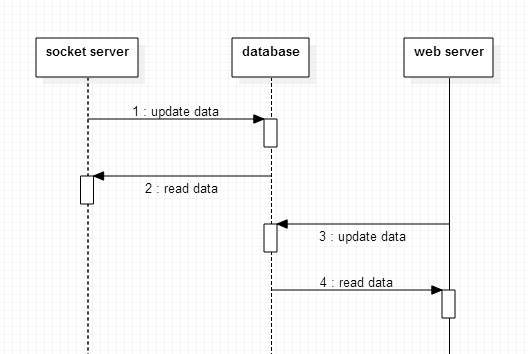
(1) Share data with each other by placing a database between the socket server and WAS
Although it is intuitive and simple, it has the disadvantage of increasing the processing load on the database, processing more than data sharing, and making it impossible to send requests to the socket server and receive responses from WAS.
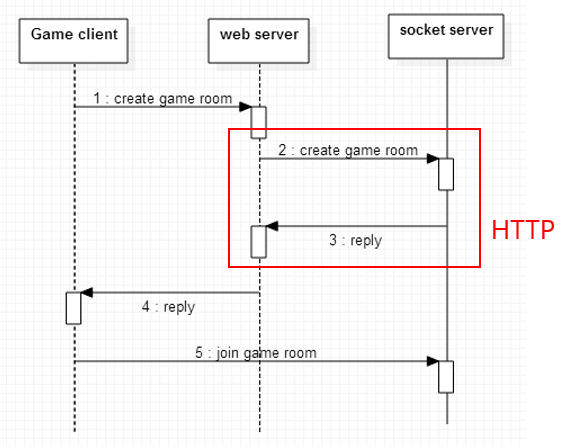
(2) Socket server is equipped with the ability to process HTTP request responses, and WAS sends requests to the socket server in HTTP.
There are ways to do this, such as using the Microsoft REST SDK to write to a socket server.
(3) Use non-HTTP socket communication between WAS and a socket server
The WAS sends commands to the plugin, and the plugin takes those commands and sends them to the socket server. For ProudNet, you can use NetClient or LanClient.
How to program plugins in WAS
PHP: CGI or FastCGI ASP.NET: C# class library node.js: C plugin Java: JNI
Creating a bad network environment
It imitates a bad network environment by blocking UDP communications. You can temporarily or permanently stop UDP communication by calling Proud.CNetClient.TEST_FallbackUdpToTcp.
TCP delayed sending and the Nagle algorithm
TCP has a built-in delayed sending feature that allows it to remain efficient when communicating on the WAN Internet, but it sends the data that needs to be sent to the other party with a slight delay.
The delayed transmission feature is sometimes referred to as the Nagle algorithm. The Nagle algorithm delays sending by 0.01 to 0.7 seconds, which can be unsuitable for online games, so ProudNet provides the ability to turn it off. When Nagle algorithm is turned off, Delayed Send will be at most 0.01 seconds to prevent Silly Window Syndrome.
For information on how to control the Nagle algorithm, please see below.
| C++ function | Description |
|---|---|
Proud.CStartServerParameter.m_enableNagleAlgorithm | Enable or disable the TCP delayed delivery feature and the Nagle algorithm feature. |
Proud.CStartLanServerParameter.m_enableNagleAlgorithm | - |
Bypassing Apple's IPv6 policy
Due to Apple's policy, you cannot use addresses in the following formats when connecting to the server.
11.22.33.44
1122:3344:5566:7788:1122:3344:5566:7788
Instead, you must write the hostname in FQDN format.
myserver1.mygame.comIf you need to respond to Apple's policy quickly but you do not have the time to assign FQDN names for all your servers right away, you can use the bypassing solution provided by ProudNet.
In addition to the server address you want to connect to, you can enter different FQDNs in [1] and [2] as follows.
CNetClient* nc = CNetClient::Create();
p.m_serverIP = "11.22.33.44";
p.m_publicDomainName1 = "www.nettention.com"; // [1]
p.m_publicDomainName2 = "www.nts.go.kr";  // [2]
nc->Connect(p);
Caution
[1] and [2] must be different domains.
[1] and [2] must not have IPv6 addresses.
NetClient never actually connects to the servers at [1] and [2], but [1] and [2] must be valid hosts.
This bypassing is not a fundamental solution and does not guarantee normal access to all NetServers. To fundamentally solve this problem, you must use the host name in FQDN format as recommended by Apple.
Reference
Unicode-to-Multibyte Interconversion
Because ProudNet uses Unicode, we recommend that you use Unicode in your development, but you can use ProudNet even if your program does not use Unicode.
If Unicode cannot be used (e.g., if the existing program is not already Unicode-based), the string input to ProudNet must be converted to Unicode and the output string must be converted to the multibyte code MBCS.
The classes that play this role are Proud::StringA2W, Proud::StringW2A.
The Proud::StringA2W class is responsible for converting MBCS to Unicode, while Proud::StringW2A converts Unicode to MBCS and vice versa.
C++
void Foo()
{
    // Unicode to MBCS conversion
    Proud::String a=L"ABC";
    const char* b = Proud::StringW2A(a);

    // MBCS to Unicode conversion
    Proud::String c = Proud::StringA2W(b);
}